
The Evolution of the Reusable Digital Notepad
The journey of the reusable digital notepad has taken us from simple “etch-a-sketch” style toys to sophisticated E Ink machines that rival the complexity of a laptop, yet maintain the simplicity of a legal pad. As we navigate 2026, the market has branched into three distinct technological paths: E Ink, LCD, and Hybrid Paper.

Choosing the right technology depends entirely on your workflow. Are you drafting a 50-page technical specification, or are you jotting down a phone number while on a call?
| Feature | E Ink Tablets | LCD Smart Pads | Hybrid (e.g., Rocketbook) |
|---|---|---|---|
| Writing Feel | Textured, paper-like haptics | Smooth, glass-like or matte | Real pen on synthetic paper |
| Battery Life | 2 weeks to 3 months | Months to Years (Zero-power) | No battery required |
| Visibility | Excellent in sunlight | Best indoors/Dark mode | Natural paper visibility |
| Primary Use | Deep work & Reading | Quick memos & Doodles | Meetings & Field notes |
| Digital Sync | Automatic Wi-Fi Sync | Manual app scan/Bluetooth | Manual app scan |
For a deeper dive into these categories, check out our guide on digital-paper-notebooks-a-comparison-of-the-top-contenders.
E Ink Technology for Deep Work
E Ink is the gold standard for anyone who spends hours writing. Unlike the glowing pixels of a tablet, E Ink uses tiny microcapsules of pigment that move to the surface of the screen. This creates a high-resolution image that looks exactly like printed ink.
The biggest draw here is the distraction-free environment. Professional-grade E Ink devices don’t have social media notifications or email pings. They are designed for “Deep Work.” Engineers love them for circuit diagrams and complex math because the screen is glare-free and easy on the eyes, even after eight hours of use. Furthermore, many of these devices now offer color support, which is a game-changer for color-coding architectural plans or creative storyboards. You can explore more about these high-end options in our list of the best-digital-paper-notebooks.
Zero-Power LCD Screens for Quick Notes
On the other end of the spectrum are LCD-based smart pads. These are the “always-on” workhorses of the reusable digital notepad world. Modern LCD smart pads use a specialized canvas that requires zero power to maintain an image. You can write a to-do list, leave it on your desk for a week, and the battery won’t drain a single percentage point.
These devices often feature a “Dark Mode” display which reduces eye strain and provides a high-contrast writing surface. The “instant erase” button is the standout feature here—one tap and you have a fresh canvas. For professionals who need a “digital whiteboard” that fits in a briefcase, these are hard to beat.
Maximizing Productivity with Cloud Sync and AI
The true magic of a reusable digital notepad isn’t just the writing; it’s what happens after the pen leaves the page. In 2026, the integration of Artificial Intelligence (AI) has transformed static notes into dynamic assets.
Modern systems now include Optical Character Recognition (OCR) that is frighteningly accurate. It can take your “doctor’s handwriting” and turn it into a clean, searchable Word document or a Slack message. Some advanced platforms even allow you to use an infinite canvas where you can pan and zoom across your ideas, using AI to summarize long meetings or generate mind maps from your scribbles.
Digitizing the Reusable Digital Notepad Experience
Digitization solves the “27 notebooks under the desk” problem. Once your notes are in the cloud, they become searchable. Imagine typing “Project X” into your phone and instantly finding the sketch you made three years ago on a reusable digital notepad.
Most devices export to PDF or PNG, but the real power lies in AI-powered summarization. You can take ten pages of lecture notes and ask the software to “give me the five key takeaways.” This makes the transition from analog thought to digital execution seamless. If you’re wondering how to manage the physical side of this, we’ve put together a guide on how-to-erase-and-reuse-smart-notebooks to keep your hardware in top shape.
Hybrid Paper-Digital Solutions
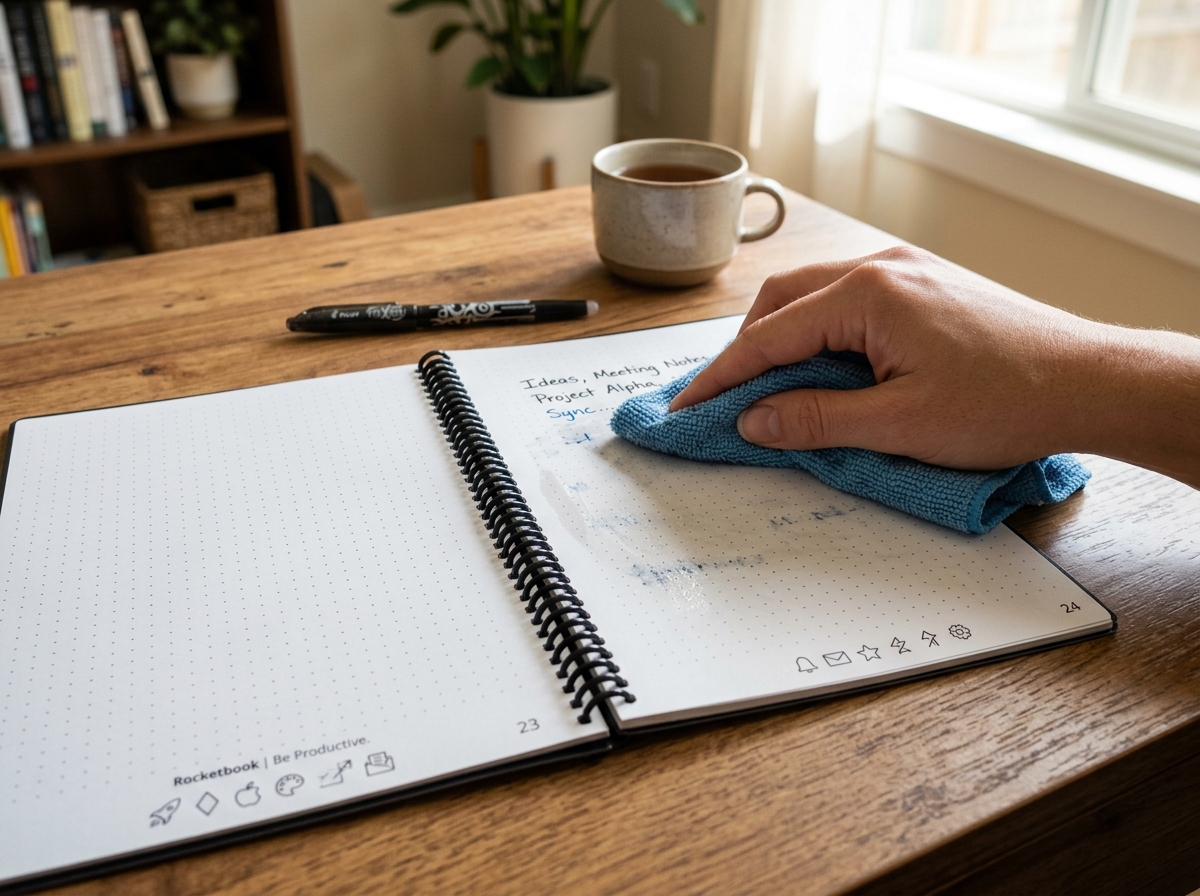
For those who aren’t ready to give up the feeling of a real pen, hybrid solutions like the Rocketbook Fusion are the perfect bridge. These use synthetic polyester pages that feel like high-quality paper but can be wiped clean with a damp cloth.
You use a specific pen (like the Pilot FriXion), write your notes, and then use a mobile app to “scan” the page. The app recognizes symbols at the bottom of the page to automatically send the file to specific folders in Google Drive, Dropbox, or iCloud. It’s a low-tech, high-utility approach that requires no charging and survives the occasional coffee spill.
Sustainability and Cost-Efficiency in 2026
The environmental impact of our stationery habits is often overlooked. A single reusable digital notepad can replace hundreds of traditional paper notebooks over its lifetime. For a student taking five classes a semester, the savings in both paper waste and physical weight are massive.
From a cost perspective, while the upfront price of an E Ink tablet (ranging from $399 to over $600) might seem steep, it’s a long-term investment. When you factor in the cost of premium paper notebooks, pens, and the time saved searching for lost information, the device pays for itself within a year or two. However, it’s worth noting that international tariffs and supply chain shifts in 2026 have led to price increases for some high-end E Ink displays. This makes the durable, lower-cost hybrid and LCD options even more attractive for budget-conscious users. You can read more about the eco-friendly benefits in our article exploring-the-best-reusable-notebooks-for-sustainability.
The Best Reusable Digital Notepad for Students and Pros
We’ve found that different users have very specific needs:
- Students: Usually prefer hybrid notebooks or E Ink tablets for the ability to annotate PDFs directly. Being able to search through a semester’s worth of biology notes in seconds is a superpower during finals week. Check out our recommendations for reusable-notebooks-for-students.
- Engineers/Architects: Tend to lean toward large-format E Ink screens (10 inches or larger) that allow for detailed technical drawing and layering.
- Creatives: Often enjoy the “infinite canvas” of browser-based tools or the pressure sensitivity of high-end digital pens for sketching.
- Minimalists: Love the zero-power LCD pads for simple to-do lists and the “one-in, one-out” philosophy of a single reusable tool.
Maintenance and Care for Infinite Use
To ensure your reusable digital notepad actually lasts for years, a little TLC goes a long way. Unlike a standard notebook that you can toss in a backpack and forget, these are precision instruments.
Cleaning and Page Care
For hybrid notebooks, the golden rule is to use a damp microfiber cloth. Avoid using the eraser on the pen itself, as the friction can eventually wear down the synthetic coating on the pages. For E Ink screens, a simple dry microfiber cloth is usually enough to remove fingerprints. Never use harsh chemicals or window cleaners on these screens!
Stylus and Battery Management
If you’re using an E Ink device, keep an eye on your stylus nibs. They are designed to wear down slowly to create that “paper-like” friction. If the nib becomes jagged, it can scratch your screen. For LCD pads, the battery (often a small coin cell) can last for years, but it’s good practice to know where the compartment is. For more on keeping your gear ready, see our guide on smart-notebook-ink-replacement-options-2.
Choosing the Right Accessories
The right accessories can transform your experience. A magnetic folio isn’t just for looks; it protects the sensitive screen and often acts as a stand.
When it comes to pens, not all styluses are created equal. Some offer premium stylus features with built-in erasers, while others prioritize a heavy, balanced feel that mimics a luxury fountain pen. If you are using a hybrid notebook, ensuring you have a steady supply of compatible ink is vital. We’ve reviewed the best-performing-pens-for-smart-notebooks to help you find your perfect match.
Frequently Asked Questions about Reusable Notepads
How do I digitize my handwritten notes?
For E Ink tablets, this happens automatically via Wi-Fi. For hybrid and LCD models, you typically use a companion app on your smartphone. You “scan” the page with your camera, and the app uses edge-detection and enhancement to create a perfectly flat, high-contrast digital file.
Can I use any pen on a reusable notebook?
No! This is the most common way people ruin their notebooks. Hybrid notebooks require erasable pens like the Pilot FriXion line. E Ink tablets require a specific EMR (Electromagnetic Resonance) stylus. Using a ballpoint pen on a digital screen will cause permanent damage.
How long does the battery last on E Ink vs LCD models?
E Ink devices typically last between 2 weeks and 2 months depending on how much you use the backlight. LCD smart pads are much more efficient; many use a “watch battery” that lasts for 1–2 years because they only use power when you hit the “erase” button.
Conclusion
The shift toward the reusable digital notepad isn’t just a tech trend; it’s a fundamental change in how we capture human thought. By bridging the gap between the tactile nature of handwriting and the infinite scalability of the cloud, these tools allow us to work smarter, stay organized, and reduce our environmental footprint.
Whether you’re an engineer mapping out a new bridge, a student prepping for exams, or a creative soul sketching your next masterpiece, there is a reusable solution that fits your desk. At Open Diode, we are proud to be at the forefront of this movement, offering cloud-connected smart notebooks that ensure your ideas are never lost again.
