
The Power of the App Sync Handwriting Notebook
A app sync handwriting notebook lets you write on real paper and instantly turn those notes into digital files. This technology blends the best of analog and digital note-taking by:
- Digitizing in Real-Time: Your handwritten text and drawings appear on your device as you write.
- Converting to Text: Transform handwriting into editable, searchable typed text.
- Syncing to the Cloud: Automatically save notes to popular cloud services for access anywhere.
- Organizing Smartly: Easily categorize, tag, and find your notes without paper clutter.
Many people love the tactile experience of writing by hand. It helps with memory and creativity. But managing stacks of paper notes can be a hassle. Imagine being able to enjoy that natural writing process and have all your notes organized, searchable, and always with you. That’s the promise of these smart systems. They solve the problem of lost notes and messy desks, giving students and professionals a seamless way to keep their ideas flowing.

The Evolution of the App Sync Handwriting Notebook
For centuries, we’ve relied on the simple combination of pen and paper. While computers and tablets have become our primary tools for work, many of us still reach for a physical notebook when we need to brainstorm or learn. Why? Because the physical act of writing is scientifically proven to improve cognitive retention and spark creativity in ways that typing just can’t match.
However, the “paper problem” is real. Physical notebooks are hard to search, easy to lose, and take up physical space. This led to the birth of the hybrid note-taking movement. We wanted the feel of paper with the brain of a computer. The result is the modern app sync handwriting notebook.
This technology has moved from a niche gadget for tech enthusiasts to a mainstream productivity staple. In fact, over 1 million Rocketbooks have been sold, proving that the world is ready to embrace a paperless movement that doesn’t actually require giving up paper. This evolution represents a shift toward minimalism—getting rid of the clutter while keeping the utility. For those interested in how these devices fit into a simplified lifestyle, check out how Smart Notebooks A Minimalists Dream Come True.
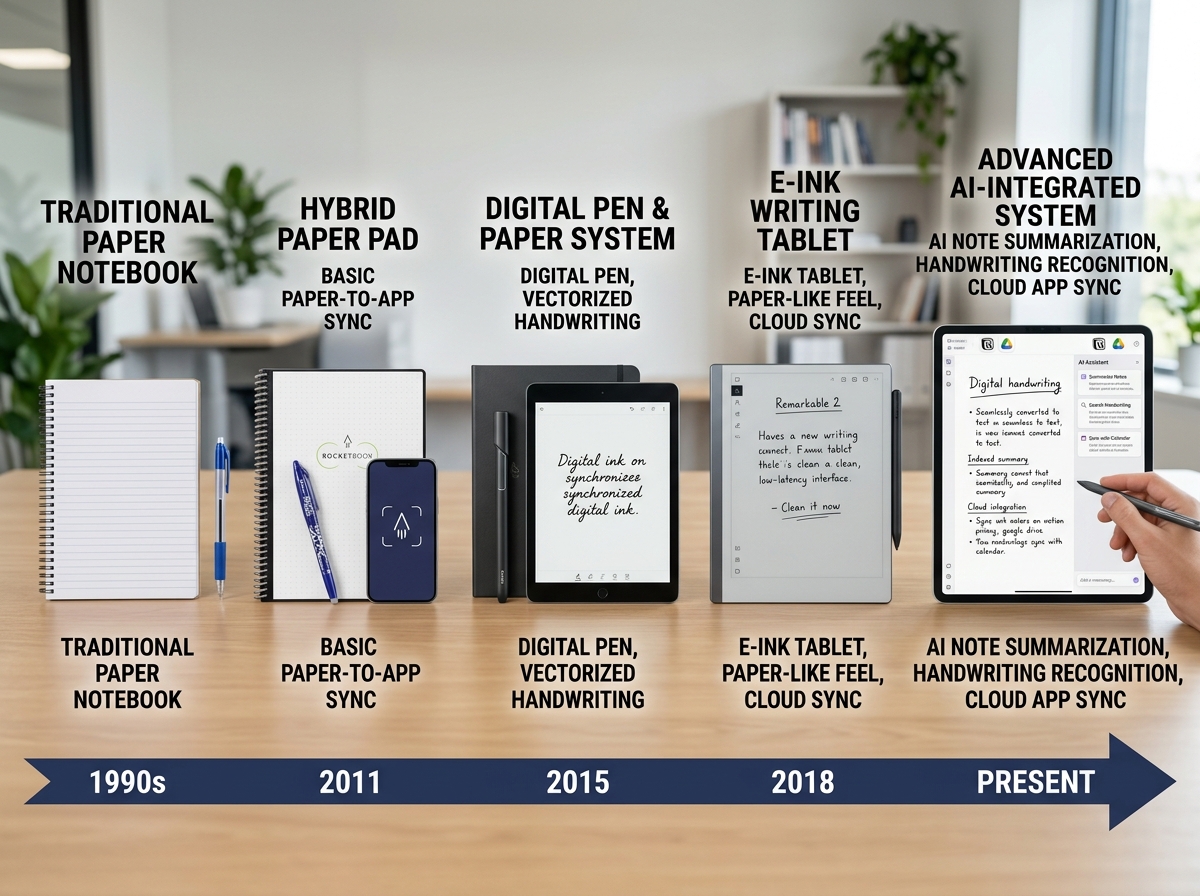
Core Technologies in an App Sync Handwriting Notebook
How does a piece of paper talk to a smartphone? It’s not magic, though it certainly feels like it! There are three primary technological paths that enable this synchronization:
- Smart Pen Systems: Professional smart pens use a tiny infrared camera near the pen tip. This camera tracks the pen’s movement across special paper printed with a nearly invisible grid of dots. As you write, the pen records every stroke and beams it to your app via Bluetooth.
- Scanning and OCR Apps: Systems like Rocketbook use specialized synthetic paper and high-contrast borders. Once you finish a page, you use a mobile app to “scan” it. The app uses Optical Character Recognition (OCR) to read your handwriting and file the note in the correct cloud folder based on symbols you mark on the page.
- Active Stylus and Tablet Apps: While these are fully digital, advanced digital ink applications use advanced AI to treat digital ink like real-time data, allowing for responsive documents where handwriting reflows like typed text.
If you are curious about which hardware suits your style, we have put together a guide on Digital Paper Notebooks A Comparison Of The Top Contenders to help you decide.
Benefits of Using an App Sync Handwriting Notebook for Professionals
In a professional setting, a app sync handwriting notebook is a game-changer for meeting efficiency. We’ve all been in that situation where we’re typing on a laptop during a meeting, and the screen acts as a physical barrier between us and our colleagues. Handwriting keeps us engaged and present.
With a smart system, those handwritten meeting notes don’t just sit in a drawer. They become searchable archives. You can search for a keyword like “Project Delta” across months of handwritten notes and find exactly what you need in seconds. Furthermore, real-time collaboration becomes possible. Some systems allow you to cast your handwriting to a screen or share it instantly as a PDF, making it easier to manage tasks and share ideas with the team. To learn more about optimizing your workflow, see How Smart Notebooks Can Streamline Your Writing Process.
Key Features: OCR, AI, and Cloud Integration
The real “brain” of a smart notebook system lies in its software. Modern apps are no longer just storage bins for images; they are sophisticated AI engines.
- Handwriting-to-Text (OCR): This is the most sought-after feature. High-end apps now support a staggering number of languages. For instance, leading systems now support over 70 handwriting recognition languages. This means you can write in your native tongue and have it converted into editable Word or TXT files instantly.
- AI Enhancements: Artificial Intelligence is now being used for summarization and study tools. Some apps can take your long-form handwritten lecture notes and generate a bulleted summary or even a quiz to help you study.
- Smart Search: Because the app recognizes the letters you draw, you can search your handwriting just like you search a Google Doc.
- Cloud Destination Symbols: This is a favorite for organization. You can assign icons at the bottom of a page to specific destinations like Google Drive, Evernote, or Slack. Check the icon, scan the page, and the note goes exactly where it belongs.
For a deeper dive into which devices offer the best connectivity, read our review on The Best Cloud Connected Smart Notebooks For Seamless Syncing.
| Feature | Scanning App Systems (e.g., Rocketbook) | Smart Pen Systems |
|---|---|---|
| Real-time Sync | No (Scan after writing) | Yes (Syncs as you write) |
| Battery Required | No | Yes (Pen needs charging) |
| Paper Type | Reusable Synthetic | Special Dotted Paper |
| Audio Recording | No | Often included (Syncs audio to strokes) |
| Cost | Lower (Affordable) | Higher (Pen hardware cost) |
Sustainability and Reusability in Smart Systems
One of the most exciting aspects of the app sync handwriting notebook market is the move toward sustainability. We are big fans of the “write, scan, erase” cycle.
Many smart notebooks use synthetic polyester pages. When you write on these pages using a specific type of ink—most commonly the Pilot FriXion line—the ink stays put until you apply moisture. A simple damp microfiber cloth can wipe the entire page clean, making the notebook infinitely reusable.
This offers two major benefits:
- Eco-Friendly: You stop wasting hundreds of paper pages every year. Some users jokingly claim they’ve “saved a forest” just by switching to a reusable system.
- Cost Savings: While the initial investment in a smart notebook might be higher than a $2 spiral pad, the fact that you never have to buy another notebook again makes it much cheaper in the long run.
To find the perfect reusable option for your desk, take a look at our list of the Best Digital Paper Notebooks.
Data Management: Storage, Privacy, and Exporting
Once your notes are digital, what happens to them? Data management is a critical consideration for anyone handling sensitive business information or personal journals.
Most app sync handwriting notebook systems offer robust cloud backup options. Whether you use iCloud, Google Drive, or Dropbox, your notes are typically encrypted and synced across all your devices. However, offline functionality is also a key feature. If you’re on a plane or in a remote area, advanced smart pens can store pages in their internal memory and sync them once you’re back online.
Exporting is equally flexible. You aren’t just stuck with a picture of your notes. You can export as:
- PDF: For easy sharing and reading.
- DOCX/TXT: For editing your transcribed handwriting.
- SVG/Vector Art: Perfect for designers who want to turn a hand-drawn sketch into a scalable digital graphic.
- MP4: Some pens can even export a video of your writing process, which is fantastic for educational tutorials.
Privacy is often a concern, but leading app developers state they never store content on their servers without explicit user consent. For more tips on keeping your digital library tidy, see our guide on Techniques To Enhance Note Organization And Retrieval Digitally and learn about Cloud Backup For Smart Notebooks.
Frequently Asked Questions about Digital Notebooks
Can I use any pen with a smart notebook?
No, it depends on the system. If you are using a reusable notebook like the Rocketbook Flip, you must use Pilot FriXion pens. The heat-sensitive ink is what allows the pages to be wiped clean. If you are using a smart pen system, you must use the specific smart pen provided, though you can usually buy standard ink refills for the pen itself.
How accurate is handwriting-to-text conversion?
It is surprisingly accurate! Modern AI recognition can handle even slightly messy handwriting. Most systems boast over 90% accuracy. Factors that help include writing in straight lines and avoiding excessive cursive loops. Many apps also allow you to create “custom dictionaries” so the AI recognizes specialized industry jargon or names.
Do these notebooks work without an internet connection?
Yes. Most smart pens have internal memory that can store dozens of pages of notes. Once you reconnect to your phone or tablet via Bluetooth, the app will “pull” those notes and sync them to the cloud. Scanning-based notebooks don’t need power at all; you only need the internet when you are ready to upload the scan from your phone.
Conclusion
At Open Diode, we believe that technology should enhance our natural habits, not replace them. The app sync handwriting notebook is the perfect example of this philosophy. It honors the traditional, tactile joy of writing while providing the powerful organization tools of the digital age.
Whether you are a student trying to ace your exams with AI-generated quizzes, or a professional looking to declutter your desk and secure your meeting notes in the cloud, there is a smart notebook system designed for you. By choosing a reusable, cloud-connected system, you are not just boosting your productivity—you are also making a sustainable choice for the planet.
Ready to transform your note-taking? Explore The Ultimate Guide To Smart Notebook Integration or Visit Open Diode to find the perfect tools for your digital transformation.
