
The Rocketbook Wave Microwave Erase Process: What You Need to Know
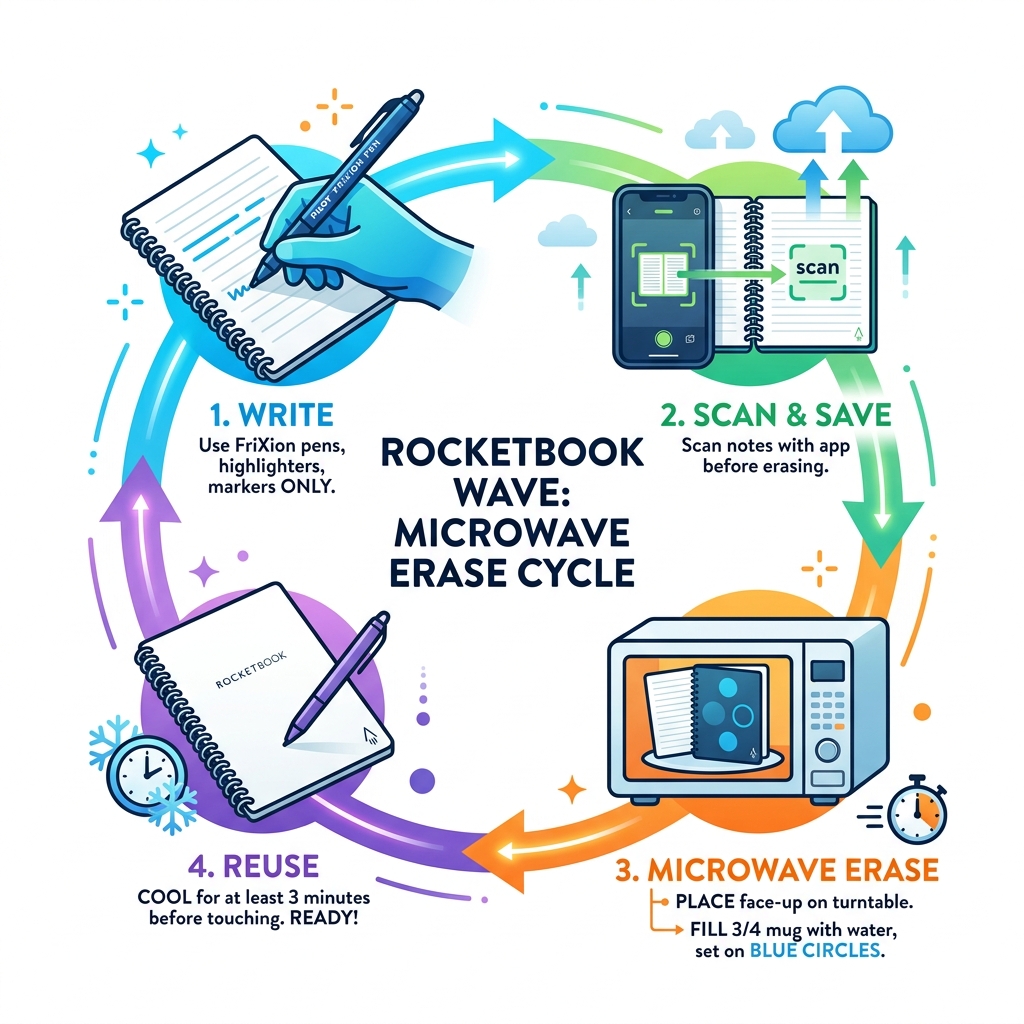
Rocketbook Wave microwave erase is a simple process that lets you wipe your entire notebook clean using a standard microwave oven. Here’s the quick version:
- Write with a Pilot FriXion pen, highlighter, or marker only
- Scan your notes using the Rocketbook app before erasing
- Place the notebook face-up on your microwave’s rotating turntable
- Set a microwave-safe mug filled 3/4 with water on the blue circles on the cover
- Microwave in 30-second intervals until the logo changes from dark to light
- Flip the notebook and repeat for the back side
- Cool for at least 3 minutes before touching
That’s the core process. But getting it wrong can damage your notebook — or worse, your microwave.
The Rocketbook Wave is a reusable smart notebook built around one clever idea: instead of buying a new notebook when it’s full, you erase it and start over. The secret is Pilot FriXion ink, which turns invisible when heated above 140°F (60°C). The notebook itself is specially constructed to survive the microwave — but only if you follow the steps correctly.
It’s a genuinely useful tool for anyone drowning in paper notes. One notebook, used again and again, with your notes safely backed up to the cloud. But microwaving a notebook sounds strange enough that it’s easy to get wrong.
This guide walks you through exactly how to do it safely.
Understanding the rocketbook wave microwave erase Technology
To understand how a rocketbook wave microwave erase actually works, we need to look at the science of “thermochromic” materials. While it might feel like magic when your handwritten notes vanish in the microwave, it is actually a very specific chemical reaction.
The Rocketbook Wave relies exclusively on Pilot FriXion ink. This isn’t your standard ballpoint ink. FriXion ink is designed to be heat-sensitive. Specifically, Pilot FriXion ink turns clear at 140 degrees F (60 degrees C). When you use the eraser on the end of a FriXion pen, you aren’t actually scraping the ink off the paper; you are using friction to generate heat, which triggers the ink to become transparent.
The Rocketbook Wave takes this concept to a larger scale. Instead of erasing one word at a time with physical friction, we use the microwave to apply consistent heat to the entire notebook at once. The notebook itself is constructed with microwave-safe materials—unlike traditional spiral-bound notebooks that contain metal coils—allowing it to withstand the temperatures required to clear the pages.
For those interested in the deeper science, you can read more about thermochromic materials to see how heat changes the molecular structure of pigments. We also recommend checking out A Guide to Erasing and Reusing Your Smart Notebook Pages for a broader look at how these smart systems interact with different paper types.
Essential Tools for a Successful rocketbook wave microwave erase
Before you go popping your notebook into the kitchen appliance, we need to make sure you have the right gear. Not all microwaves or pens are created equal in smart stationery.
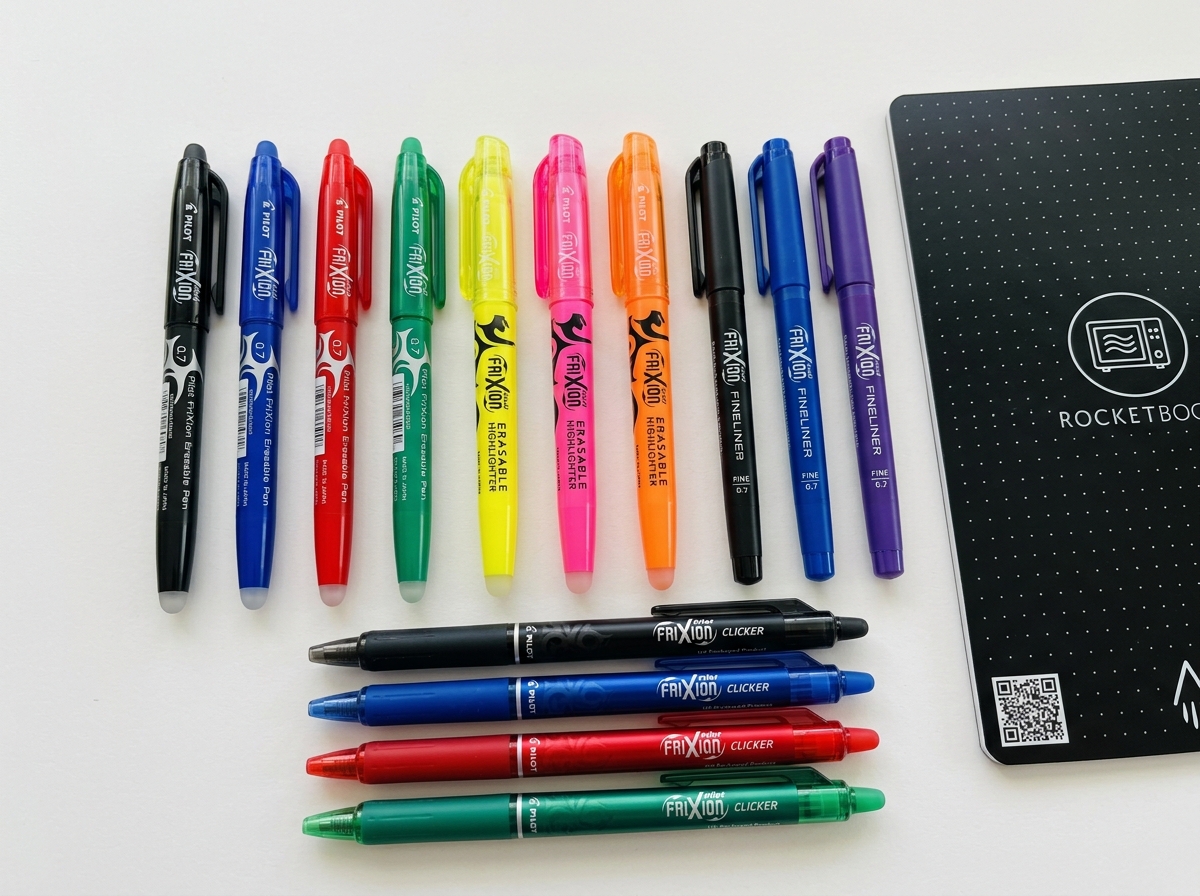
- The Correct Pen: This is the most critical step. You must use Pilot FriXion pens, markers, or highlighters. If you write with a standard ballpoint or gel pen, that ink is permanent. Microwaving it will do nothing to the ink but might actually bake it into the page forever.
- A Rotating Turntable: Your microwave must have a rotating glass turntable. This is non-negotiable. If the notebook sits still, the microwaves will hit certain spots more than others, leading to “hot spots” that can scorch the paper or even cause a fire.
- The Right Size: Size matters here.
- The Executive Wave requires a minimum microwave turntable diameter of 11 inches (27.94 centimeters).
- The Standard Wave requires a minimum microwave turntable diameter of at least 12.5 inches (31.75 centimeters). If your notebook hits the walls of the microwave and stops rotating, stop the process immediately.
- A Microwave-Safe Mug: You will need a standard ceramic mug. Do not use travel mugs with metal or plastic components.
- Water: You’ll be filling that mug to the 3/4 mark.
Having the right Accessories for Rocketbook Users ensures that your notebook lasts as long as possible and that the erasing process remains safe and effective.
How to Execute the rocketbook wave microwave erase Process
Now that we have our tools, let’s walk through the actual “cooking” process. We like to joke that it’s the only time “nuking” your work is a good thing!
First, fill your microwave-safe mug 3/4 full with water. This water is essential because it acts as a heat sink, absorbing some of the microwave energy so the notebook warms up in a controlled, even manner. Without the water, the paper can dry out too quickly or get dangerously hot.
Place your Rocketbook Wave in the center of the turntable. Look at the front cover; you’ll see a set of blue circles. Place your water mug directly on top of those circles.
Set your microwave for a short burst. We recommend checking the notebook every 30 seconds. While the total time varies depending on the wattage of your microwave, you are looking for one specific visual cue: the Rocketbook logo on the cover. This logo is printed with the same thermochromic technology. When the logo turns from dark to light (or disappears), it means the internal temperature has reached the threshold to clear the ink.
Once the logo changes on the front, carefully remove the mug (it will be hot!), flip the notebook over, replace the mug on the back circles, and repeat the process.
The Cooling Phase: This is where many people make a mistake. Once the microwave dings, the ink hasn’t fully “set” into its transparent state yet. You must allow the Rocketbook Wave to cool for at least 3 minutes before touching it. You’ll know it’s ready when the logo returns to its original dark color. This cooling period also allows the paper fibers to settle, which helps prevent “ghosting” in future uses.
For more tips on maintaining your workflow between erasures, see our guide on Organizing Your Notes Effectively in Rocketbook.
Preparation: What You Need Before You Microwave
We’ve all had that moment of panic where we realize we threw away something important. With the rocketbook wave microwave erase process, that “trash can” is the microwave. Once you heat that book, those notes are gone.
Before you even think about the kitchen, you must sync your notes. The Rocketbook App is designed to make this seamless. By using the symbols at the bottom of each page, you can “blast” your notes to specific cloud services like Google Drive, Dropbox, or iCloud.
We recommend a “Double Check” policy:
- Open the app and ensure the scans are legible.
- Verify that the OCR (Optical Character Recognition) has correctly transcribed your titles if you use that feature.
- Ensure the destination folder in your cloud storage actually contains the new files.
The Rocketbook Wave is five times more eco-friendly than traditional notebooks because of this cycle, but that eco-friendliness is only valuable if your data is safe. If you’re new to digital-physical hybrids, our article on How to Erase and Reuse Smart Notebooks provides a great overview of the scanning-to-erasing pipeline.
Safety Precautions and Common Mistakes to Avoid
Safety is our top priority at Open Diode. While microwaving a notebook is a fun party trick, it involves high temperatures and radiation.
1. The “No Water” Disaster: Never, ever microwave the Wave without the mug of water. We’ve seen cases where users forgot the water, and the notebook began to smolder. The water regulates the energy in the microwave cavity. According to Scientific research on microwave safety, microwaves work by vibrating water molecules. By providing a mug of water, you give the microwave a primary target for that energy, protecting the dry paper of the notebook from overheating.
2. The Rotation Requirement: If your microwave’s turntable is broken, do not attempt to erase your Wave. Stationary heating will almost certainly result in scorched pages. If the notebook is too large to spin freely, it will jam against the side, leading to the same dangerous result.
3. Writing Pressure and Ghosting: “Ghosting” is when you can still see a faint outline of your old notes even after erasing. This usually happens for two reasons:
- Pressure: If you press very hard when writing, you physically indent the paper. The ink is gone, but the “trench” in the paper remains.
- Incomplete Erasing: If you don’t let the book cool properly or if the microwave didn’t reach the full 140°F, some ink may remain visible.
4. The Wrong Pen: We cannot stress this enough. Using a non-FriXion pen is a permanent mistake. If you accidentally use a regular pen, that page is now a permanent part of your notebook. Don’t try to microwave it longer to “force” it to erase; you’ll only risk a fire.
To keep your notebook in top shape, check out our list of Essential Accessories for Rocketbook Users to ensure you’re using the right pens and cleaning cloths.
Frequently Asked Questions about Microwaving Notebooks
How many times can I reuse the Rocketbook Wave?
The official word is that the Rocketbook Wave can be erased and reused up to 5 times. However, in our experience and based on general user feedback, many users can expect 5-10 reuses before the paper quality begins to degrade significantly.
The “limit” isn’t about the ink—it’s about the paper. Every time you microwave the notebook, you are removing a tiny amount of moisture from the pages. Over time, the paper can become brittle, or the “tooth” of the paper (the texture that allows the pen to grip) can wear down. To maximize the life of your Wave, always use the water mug and never exceed the time needed for the logo to change color.
Using reusable notebooks is a fantastic step toward sustainability. You can learn more about the environmental impact in our piece Exploring the Best Reusable Notebooks for Sustainability.
What if I accidentally erase my notes?
It happens to the best of us. Maybe you left your notebook in a hot car on a summer day, or you microwaved the wrong book. Because FriXion ink reacts to temperature, there is a “secret” way to bring your notes back from the dead.
To make FriXion ink reappear after accidental erasing, you need to get it very cold. Place your notebook in the freezer. The ink typically starts to reappear when cooled to at least 14°F (-10°C). Leave it in there for about 20 minutes to an hour.
Note: The ink might not come back perfectly. It often returns with a slightly faded or “milky” appearance, and it may bring back every note you’ve ever erased on that page, creating a jumbled mess. But if you’ve lost a critical phone number or a brilliant idea, the freezer method is a lifesaver.
Can I use a hairdryer instead of a microwave?
Yes! If you don’t have access to a microwave or if your microwave is too small for the notebook to rotate, a hairdryer is a valid alternative.
Using a hairdryer allows for “precision erasing.” If you only want to erase a single page instead of the whole book, you can blast that specific page with high heat. However, it is much slower than the microwave method. When using a hairdryer, keep it a few inches away from the paper and move it constantly to avoid overheating one spot.
For those looking for more creative ways to manage their smart notebooks, we have a guide on Innovative Accessories for Reusable Notebooks that covers various tools for precision editing.
Conclusion
At Open Diode, we believe that the best tools are the ones that bridge the gap between our physical habits and our digital lives. The rocketbook wave microwave erase feature is a prime example of this innovation. It allows you to keep the tactile satisfaction of pen-on-paper writing while embracing the efficiency of cloud storage.
By following the steps we’ve outlined—using the right pens, ensuring proper microwave rotation, and always including that crucial mug of water—you can enjoy a sustainable, high-tech note-taking experience for years to come. Remember to always sync before you “nuke,” and give your notebook those few minutes of peace to cool down after its trip through the microwave.
Ready to explore more smart stationery? Check out More info about notebook reviews to see how the Wave stacks up against other models like the Rocketbook Fusion. Happy writing (and erasing)!
