
Your Paper Notes Are Costing You More Time Than You Think
Converting handwritten to searchable text is easier than ever, thanks to AI-powered OCR apps that can digitize your notes in seconds.
The fastest ways to convert handwriting to searchable text:
- Mobile apps — snap a photo, get editable text instantly
- Online tools — upload a scan, download a searchable PDF
- Built-in device features — many smartphones have built-in scan-to-text tools in their native notes apps
- Cloud storage — upload an image to a cloud drive for automatic OCR processing
- Smart notebooks (like Rocketbook) — scan pages with a dedicated app and search your handwriting directly
Most tools support JPG, PNG, TIFF, and PDF formats. Modern AI can reach 95–98% accuracy on clear handwriting, and many services offer a free tier to get started.
Paper notes fade, get lost, and are nearly impossible to search through. If you’ve ever spent ten minutes flipping through a notebook looking for one phone number or meeting decision, you already know the problem.
The good news is that AI has made handwriting recognition genuinely useful. Tools today don’t just capture a flat image of your notes — they read them, embedding a searchable text layer so you can find any word in seconds.
Whether you’re a student digitizing lecture notes, a professional archiving meeting memos, or someone trying to preserve old family letters, there’s a solution that fits your workflow and budget.
This guide covers the best apps and tools, how they work, tips to improve accuracy, and how to stay organized after conversion.
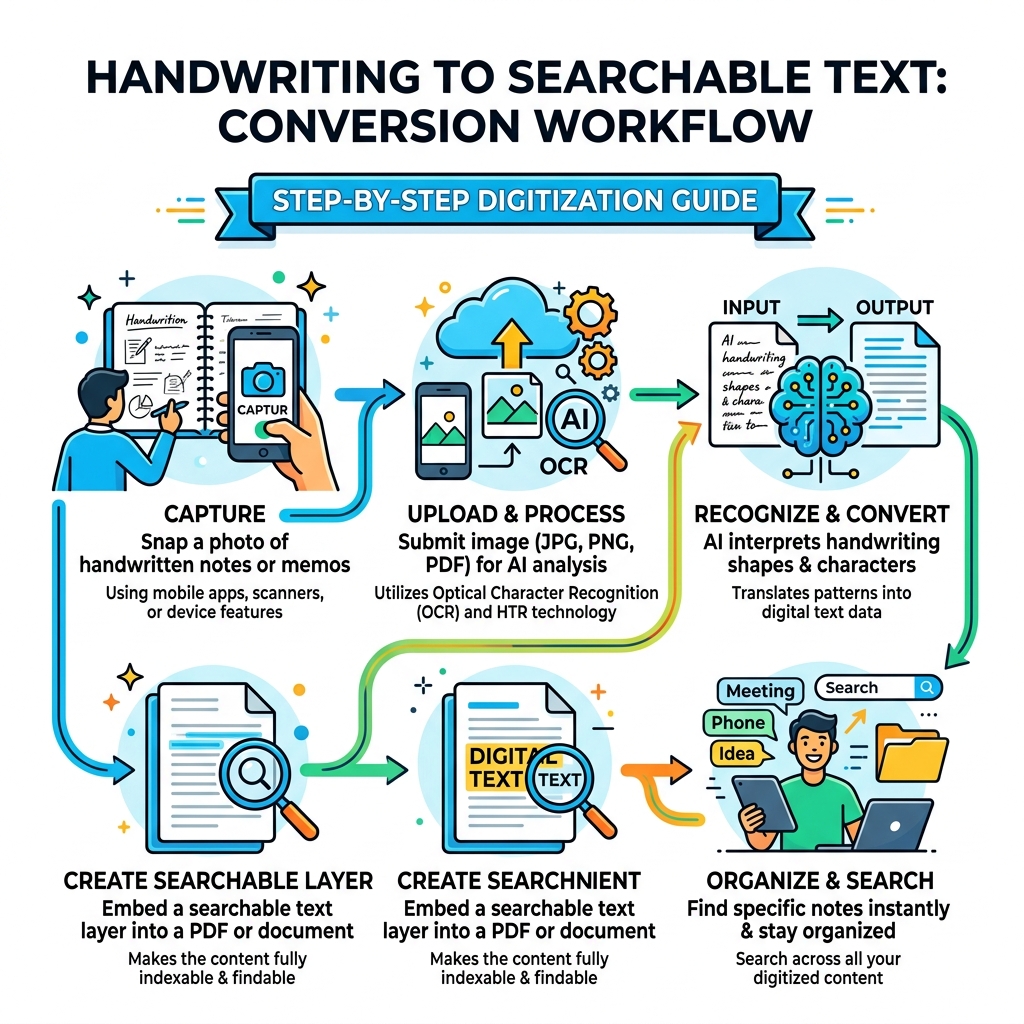
Understanding OCR and HTR for Handwritten to Searchable Text
To understand how we turn ink on paper into bits on a screen, we need to look at the “brain” behind the curtain. Traditionally, we’ve used Optical Character Recognition (OCR). This technology is fantastic for printed text-think of a scanned newspaper or a typed contract. OCR looks for the standard, uniform shapes of letters produced by a machine.
However, when it comes to handwritten to searchable text, standard OCR often hits a wall. Why? Because human handwriting is chaotic. We loop our L’s, slant our T’s, and sometimes our cursive looks more like a heart monitor readout than a sentence.
This is where Handwritten Text Recognition (HTR) comes in. While OCR looks at isolated characters, HTR uses deep learning neural networks to understand the flow of writing. It performs layout analysis to figure out where the lines are and uses character-level recognition to decipher connected cursive. It’s not just looking at a shape; it’s predicting what that shape is likely to be based on millions of other handwriting samples. If you want a general primer on OCR itself, Wikipedia’s overview of optical character recognition is a useful reference.
When you use smart-notebook-apps-features-and-functionalities-reviewed, you’re often seeing the culmination of these two technologies working together to ensure your quick memos don’t disappear into a black hole of paper.
The Evolution of AI in Handwritten to Searchable Text
The “magic” feeling of modern apps comes from machine learning. Older systems were rigid, but today’s language models are context-aware. If the AI sees a word that looks like “he1lo,” the language model knows that in the English language, “hello” is the intended word. This context awareness allows modern tools to support 100+ languages and even recognize historical scripts like Sütterlin or Fraktur.
For those of us with “doctor’s handwriting,” this evolution is a lifesaver. Pattern recognition has reached a point where AI can often read our “scrawl” better than we can ourselves!
Handling Structured Data and Tables
It’s one thing to transcribe a poem; it’s another to digitize a timesheet or a lab report. One of the biggest hurdles in the handwritten to searchable text journey is structured data. If you have a table filled with numbers, you don’t just want a list of words-you want a spreadsheet.
Advanced AI tools now offer:
- Table recognition: Automatically detecting rows and columns to export directly to Excel.
- Form processing: Identifying key-value pairs (like “Name: John Doe”) for JSON output.
- Mathematical equations: Specialized converters can turn handwritten formulas into LaTeX or editable Word equations.
By syncing-smart-notebooks-with-apps, you can transform a hand-drawn table into a functional digital document without typing a single cell.
Top Solutions for Converting Handwriting to Digital
Choosing the right tool depends on whether you are scanning one page or ten thousand. Here is how the landscape looks:
| Feature | Mobile Apps | Online Services | Specialized AI |
|---|---|---|---|
| Best For | On-the-go, quick notes | Business forms, PDFs | Historical docs, archives |
| Input | Smartphone Camera | Uploaded Scans/Images | High-res Scans |
| Accuracy | 95-98% (Clear text) | 95%+ (Messy text) | 90-95% (Historical) |
| Export | TXT, PDF, Word | Word, Excel, JSON | TEI-XML, PDF, DOCX |
| Batching | Limited | High Volume | Unlimited |
Whether you are looking for the best-apps-to-pair-with-smart-notebooks or need top-must-have-apps-to-enhance-smart-notebooks, the goal is always the same: making your data accessible.
Mobile Apps for On-the-Go Digitization
For most of us, our phone is our primary scanner. Leading mobile OCR apps use the built-in camera to capture high-contrast images. The instant transcription happens in the cloud or on-device, turning cursive into searchable notes in seconds.
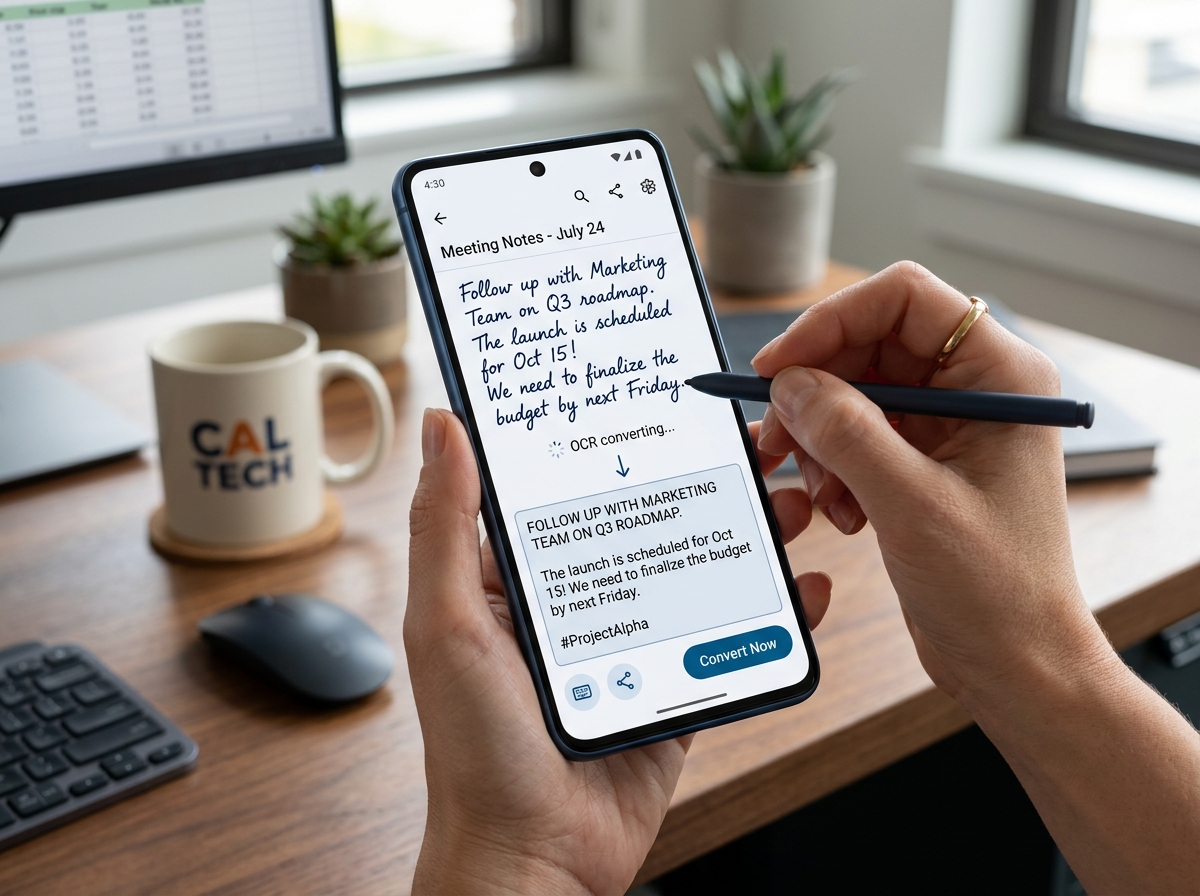
The beauty of these apps is the multi-language support. You can scan a grocery list in Portuguese or a meeting note in English, and the AI detects the script automatically.
Professional Services for High-Volume Archiving
If you have a box of 500 journals from a relative or a warehouse full of legal contracts, a mobile app will give you thumb cramps. Professional services offer batch processing and managed processing.
These platforms are built for genealogy research and historical documents. They provide enterprise-level security and GDPR compliance, ensuring that sensitive data is encrypted and often auto-deleted after processing. Some even allow you to train a custom AI model specifically on one person’s unique handwriting style to reach near-perfect accuracy.
Step-by-Step Guide to Creating Searchable PDFs
A “Searchable PDF” is like a digital sandwich. The bottom layer is the original image of your handwriting (preserving the “feel” of the note), and the top layer is an invisible text layer that you can highlight, copy, and search.
- Scan your document: Use a resolution of at least 300 DPI for best results.
- Upload to an OCR service: High-quality AI transcription tools are great for this.
- Run the HTR engine: The AI will “read” the image and generate the text.
- Embed the layer: The software places the text directly over the corresponding words in the image.
- Export as PDF/A: This format is best for long-term archiving.
This process is essential for synchronizing-smart-notebooks-with-apps, as it bridges the gap between physical ink and digital utility.
Maximizing Accuracy for Handwritten to Searchable Text
AI is smart, but it’s not a mind reader (yet). To get that elusive 98% accuracy, help the software out with these best practices:
- Use Lined Paper: This keeps your sentences straight, which helps the layout analysis.
- Dark Ink, Light Paper: High contrast is key. A black gel pen on white paper is the gold standard.
- Uniformity: Try to keep your letter sizes consistent.
- Lighting: Avoid shadows or glare when taking a photo.
- Capital Letters: If your cursive is truly illegible, writing in block capitals can significantly boost recognition.
For more tips on getting your analog and digital worlds in sync, check out our guide on synching-smart-notebooks-with-apps.
Post-Conversion Review and Organization
Once you have your text, the work isn’t quite done. Even the best AI makes mistakes (it might read “barn” as “born”).
- Review and Edit: Quickly skim the text to fix any “hallucinations” or typos.
- Formatting: Add bold headers or bullet points to make the digital version readable.
- Tagging: Use a tagging system (e.g., #meeting, #recipe, #2024) so you can find groups of notes later.
- Cloud Backup: Always sync your converted files to a service like Google Drive or Evernote.
Comparing different smart-notebook-apps-comparison can help you decide which ecosystem offers the best organization tools for your specific needs.
Frequently Asked Questions about Handwriting OCR
How accurate is modern AI at reading messy cursive?
Modern AI is shockingly good. On clear, modern handwriting, top-tier OCR tools report 95-98% accuracy. For messy “chicken scratch” or faded historical documents, accuracy usually sits between 85-95%. The word error rate is often less than 1% for high-quality scans.
Are online OCR tools safe for private documents?
Most reputable services prioritize privacy and security. Look for tools that offer bank-grade encryption, are GDPR-compliant, and have a policy of auto-deleting files after a short window. Crucially, check if the company uses your data to train their AI; the best professional services explicitly state they do not train their models on your private documents.
Can OCR handle multiple languages in one document?
Yes! Modern HTR engines can detect and process 100+ languages. Some platforms can even handle mixed-script documents, such as a page that contains both English and Greek or printed headers with handwritten entries.
Conclusion
The journey from handwritten to searchable text has transformed from a futuristic dream into an everyday tool. By combining the tactile joy of writing with the power of AI, you can ensure your ideas are never “lost in the notebook” again.
At OpenDiode, we believe in the power of the written word—and the necessity of digital organization. Our cloud-connected smart notebooks are designed to make this entire process seamless. Whether you’re using a Rocketbook Fusion or another smart device, we provide the bridge to a more productive, searchable life.
Ready to stop flipping pages and start finding answers? Start your digital note-taking journey with OpenDiode today.
