
The Future of Notes: Cloud Connected Writing Pads
A cloud connected writing pad is a smart device that lets you capture your handwritten notes and drawings digitally, then automatically saves them to the internet. This technology blends the natural feel of writing on paper with the power and convenience of digital storage.
Here’s how these pads typically work and what makes them so valuable:
- Digitizes Handwriting: As you write on the pad’s surface or special paper, a smart pen or internal sensors capture every stroke.
- Converts to Digital: Your physical writing is instantly turned into digital files (like PDFs or editable text).
- Cloud Sync: These digital notes are automatically uploaded to online storage services such as Google Drive, Evernote, or the device’s own cloud.
- Accessibility: Your notes become instantly accessible from any device – your phone, tablet, or computer – no matter where you are.
- Organization: Easily search, tag, and organize your notes, making lost papers a thing of the past.
Are you tired of scattered paper notes and endless notebooks? Do you wish your brilliant ideas were easier to find and share? Many of us struggle to keep our thoughts organized in a busy world. This is where cloud connected writing pads step in.
These innovative tools are changing how we take notes. They offer a unique blend of traditional writing comfort and modern digital efficiency. By combining a real pen-on-paper feel with smart features, they help you stay focused and productive. Whether you’re a student, a professional, or a creative, these pads are designed to keep your ideas safe, organized, and always at your fingertips.
The Technology Behind Handwritten Digitization
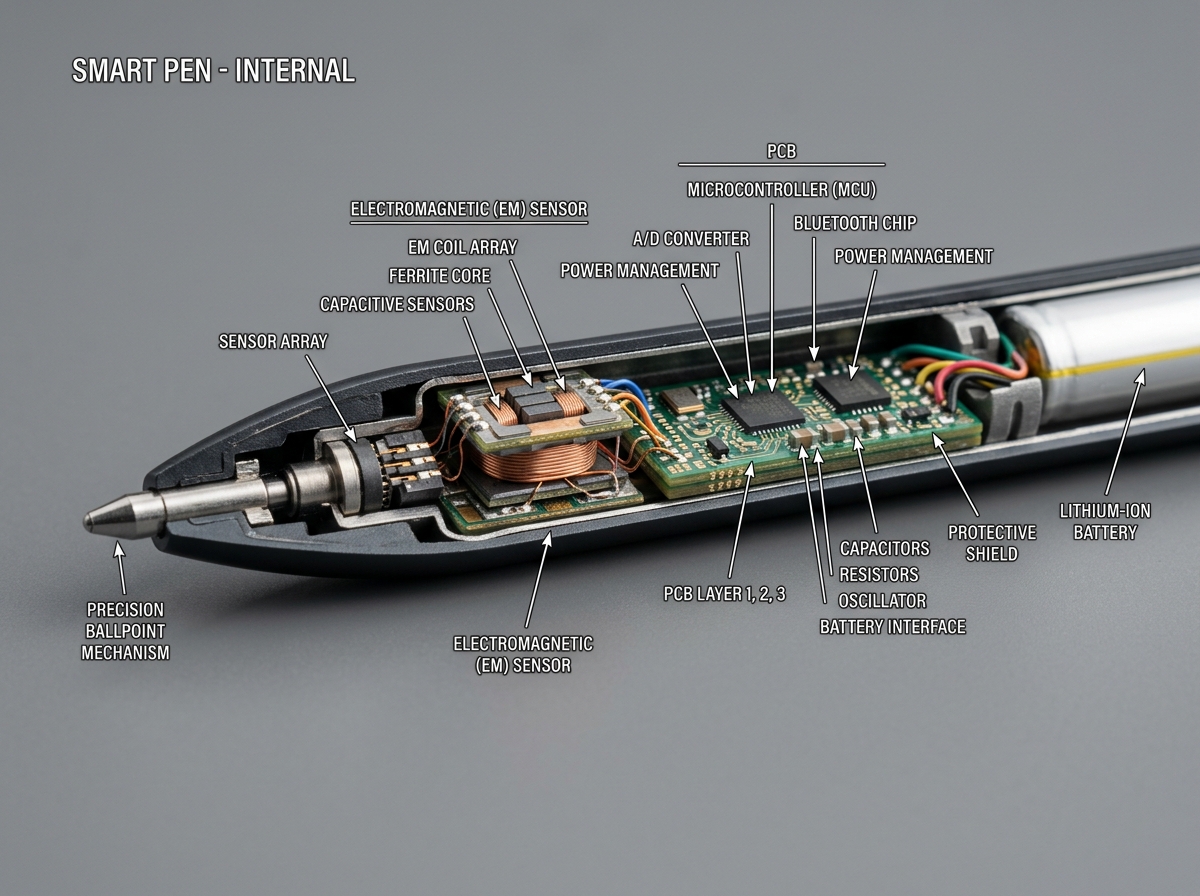
When we talk about a cloud connected writing pad, we aren’t just talking about a fancy tablet. We are talking about a sophisticated piece of engineering designed to bridge the gap between the physical and digital worlds. At the heart of most premium writing pads is EMR (Electromagnetic Resonance) technology. This tech allows the pen to communicate with the screen without needing a bulky battery in the stylus itself. It tracks the pen’s position with incredible precision, often supporting up to 8,192 levels of pressure sensitivity. This means if you press harder, the line gets thicker—just like a real ink pen.
To get those strokes from the pad to your smartphone or laptop, these devices utilize Bluetooth 5.3 or high-speed Wi-Fi. Bluetooth 5.3 is a game-changer because it offers enhanced stability and lower power consumption, ensuring your pen doesn’t lag while you’re in the middle of a breakthrough idea. Once the data reaches your device, the software takes over, often converting your scribbles into vector graphics. Unlike standard images, vector notes remain perfectly crisp even when you zoom in 500% to see that tiny diagram you drew in the corner.
For those who want to dive deeper into how these systems talk to your favorite software, we recommend checking out our guide on Synching Smart Notebooks With Apps. It’s not just about moving a file; it’s about creating a living document.
How a Cloud Connected Writing Pad Syncs to the Cloud
The magic happens the moment you lift your pen. Most modern smart pads offer “real-time capture,” where your writing appears on your phone screen simultaneously. But what if you’re on a plane or in a basement cafe with no Wi-Fi? That’s where offline storage comes in. High-quality pads can store anywhere from 50 to several thousand pages locally. The moment you reconnect to the internet, the device performs an automatic upload.
This seamless transition ensures that no thought is ever lost. We’ve all had that moment where we wrote something brilliant on a napkin only to lose it. With a cloud connected writing pad, the “napkin” is backed up to a secure server. For a full breakdown of how to keep your digital library safe, read our article on Cloud Backup For Smart Notebooks.
AI-Powered Transcription and Search
Perhaps the most impressive feat of a cloud connected writing pad is its ability to “read” your handwriting. Using OCR (Optical Character Recognition) and AI-powered transcription, these devices can turn messy cursive into searchable, editable text. Some advanced models even include ASR (Automatic Speech Recognition), allowing you to record audio during a meeting and sync it to the exact moment you wrote a specific note.
Imagine typing “Project Alpha” into a search bar and having your tablet instantly pull up a handwritten sketch from three months ago. It’s like having a personal librarian for your brain. To see which apps do this best, take a look at our Smart Notebook Apps Features And Functionalities Reviewed.
Essential Features of a Modern Cloud Connected Writing Pad
Choosing the right pad can feel overwhelming, but we believe focusing on a few core hardware specs makes the decision much easier. Here is what we look for:
- Pressure Sensitivity: Look for 8,192 levels if you’re an artist or 4,096 if you’re primarily a note-taker.
- Battery Life: The best E-ink tablets can last up to 12 weeks on a single charge, while LCD-based pads might need a boost after 14-40 hours of continuous use.
- Internal Storage: 32GB to 64GB is the sweet spot, capable of holding over 20,000 e-books or a lifetime of notes.
- Connectivity: Dual-band Wi-Fi (2.4G+5G) ensures faster file transfers.
If you are just starting your journey, our A Comprehensive Buying Guide For Smart Notebooks is the perfect place to begin.
Display Types: E-Ink vs. LCD Canvas
The screen is where you’ll spend all your time, so it needs to be easy on the eyes.
- E-Ink Screens: These mimic the look of real paper. They don’t use a backlight, meaning they don’t emit blue light that keeps you awake at night. They are glare-free and perfect for outdoor use.
- LCD Canvas: Often used in more affordable “smart pads,” these frequently feature a “dark mode” display. While they require less power for the screen itself, they lack the high-resolution reading experience of E-ink.
For professional use, we often lean toward E-ink because it combats eye fatigue during those marathon brainstorming sessions.
The Ideal User for a Cloud Connected Writing Pad
Who is this for? In our experience at Open Diode, we see three main groups:
- High Achievers: Executives who need to manage dozens of projects without carrying ten different physical notebooks.
- Students: Who want to digitize their class notes for easy exam prep and avoid the “heavy backpack” syndrome.
- Creatives: Designers who want the tactile feel of a pen but need their sketches in a digital format for Photoshop or Illustrator.
For more specific use cases, check out our Digital Notebook Gadget Reviews.
Comparing Digital Writing Ecosystems
Not all digital writing tools are created equal. Some are full-blown tablets, while others are smart pens that work on real paper.
| Feature | E-Ink Tablets | Smart Pen & Paper | Reusable Notebooks |
|---|---|---|---|
| Writing Surface | Digital Screen | Specialized Paper | Synthetic Paper |
| Resolution | Up to 300 PPI | Infinite (Analog) | Infinite (Analog) |
| Storage | 8GB – 64GB | Device-dependent | App-dependent |
| Feel | Paper-like film | Real Ink | Fluid/Smooth |
| Price Range | $250 – $700 | $100 – $300 | $20 – $50 |
We’ve found that the best choice depends on whether you want to move entirely away from paper or if you just want your paper to be smarter. For a deep dive into the top models, read Digital Paper Notebooks A Comparison Of The Top Contenders.
Integration with Productivity Apps
A cloud connected writing pad is only as good as the places it can send your data. Most of our top-tier recommendations integrate directly with:
- Google Drive: For general storage.
- Evernote: For searchable archives.
- Slack: For instantly sharing a brainstorm sketch with your team.
- OneNote: For academic organization.
The ability to “check a box” on the bottom of a physical page and have it automatically land in a specific Slack channel is the kind of efficiency we live for. You can learn more about these workflows in The Ultimate Guide To Smart Notebook Integration.
Subscription Models and Storage Costs
While many devices offer free basic syncing, some brands utilize a “Connect” or subscription model. These monthly fees (often around $3) usually unlock:
- Unlimited cloud storage.
- Advanced handwriting-to-text conversion.
- Email-to-tablet features.
We always recommend checking if your chosen pad requires a subscription to function or if the “pro” features are truly necessary for your workflow. See our list of the Best Cloud Sync Smart Notebooks to see which ones offer the best free tiers.
Maintenance and Care for Reusable Devices
If you opt for a reusable cloud connected writing pad like the ones we specialize in at Open Diode, maintenance is key. These notebooks use synthetic polyester blend pages that allow ink to be wiped away with a damp microfiber cloth.
- The Right Pen: You must use Pilot FriXion pens. Standard ink will ruin the synthetic coating permanently.
- Cleaning: We recommend cleaning your pages at least once a month. If ink stays on the page for months, it can leave “ghosting” marks.
- Pressure: Don’t press too hard! While the pages are durable, excessive pressure can leave physical indentations in the synthetic material.
Protecting Your Hardware
For E-ink tablets, the screen is the most vulnerable part. We suggest:
- Magnetic Folios: These not only protect the screen but often act as a stand.
- Nib Replacement: Smart pen nibs wear down over time. If the tip feels “scratchy,” it’s time for a change to avoid scratching the screen.
- Avoid Solvents: Never use disinfectant wipes or window cleaners on your smart pad. A slightly damp cloth is all you need.
For more tips on keeping your gadgets in top shape, check out our In Depth Review Of Digital Planner Gadgets.
Frequently Asked Questions about Smart Pads
What is the typical price range for these devices?
You can get started with a reusable notebook and app system for as little as $30. If you want a dedicated E-ink tablet with a high-resolution screen, prices typically range from $250 to over $600 for pro models with color displays.
Do I need a subscription for cloud syncing?
It depends on the brand. Some offer free syncing to third-party services like Google Drive, while others charge a small monthly fee for their proprietary “unlimited” cloud and advanced AI features.
Can I use these pads without an internet connection?
Yes! Most have internal memory that can save dozens or even hundreds of pages. They will simply wait until you are back in Wi-Fi range to sync everything to your account.
Conclusion
At Open Diode, we believe that the pen is mightier when it’s connected. The transition to a cloud connected writing pad isn’t just about following a trend; it’s about reclaiming your focus and ensuring your best ideas aren’t lost to the bottom of a drawer. By combining the tactile joy of handwriting with the infinite organization of the cloud, you get the best of both worlds.
Whether you’re looking for a simple, sustainable solution or a high-tech digital paper tablet, the future of note-taking is here. It’s time to stop searching for lost pages and start building your digital legacy.
For more information on the best tools for the job, explore The Best Cloud Connected Smart Notebooks For Seamless Syncing or visit us at https://www.opendiode.com/.
