
The Evolution of Handwritten Notes App Sync
The way we capture thoughts has undergone a massive transformation. Not long ago, “syncing” meant photocopies or manually typing up your legal pad scribbles. Today, handwritten notes app sync has evolved into a sophisticated ecosystem where digital ink behaves just like text. We have moved from simple image storage to “Interactive Ink” technology, where gestures like scratching out a word can remove that edit across synced devices.
Modern apps now prioritize cross-platform accessibility. Whether you are using an iPad with an Apple Pencil, an Android tablet with a stylus, or a Windows Surface, your notes are no longer trapped on a single piece of hardware. This shift is backed by scientific research into the “generation effect.” Studies show that the tactile act of handwriting improves brain connectivity and memory retention compared to typing. By using handwritten notes app sync, we get the cognitive benefits of the pen with the invincibility of the cloud.
| Feature | Manual Backups (Old Way) | Automatic Cloud Sync (Modern) |
|---|---|---|
| Speed | Slow, manual export/upload | Instant, real-time updates |
| Accessibility | Limited to one device | Available on iOS, Android, PC, Mac, Web |
| Data Safety | High risk of loss if device breaks | 99.9% uptime with version history |
| Searchability | None (images only) | Full OCR (Handwriting to Text) |
| Collaboration | Emailing attachments | Real-time multi-user editing |
Maximizing Productivity with Handwritten Notes App Sync
To truly get the most out of your digital scribbles, you need more than just a storage folder. The best apps utilize Optical Character Recognition (OCR) to make your handwriting searchable. Imagine typing “Project X” into a search bar and having the app highlight that specific phrase inside a coffee-stained note you wrote three weeks ago.
Productivity also thrives on organization. Some platforms use AI tags to automatically categorize your thoughts, while others focus on nested notebooks and pinned notes. If you’re wondering how these features stack up across different hardware, check out our smart notebook apps comparison to see which software handles your specific writing style best. Beyond just viewing, look for apps that offer robust PDF export and internal linking, allowing your handwritten notes to function as a “second brain.”
Security Standards for Handwritten Notes App Sync
When your intellectual property, private journals, or student notes live in the cloud, security is not just a nice-to-have – it is a requirement. Most top-tier apps now employ AES-256 encryption, which is the same standard used by banks and governments.
For those of us obsessed with privacy, some platforms also provide end-to-end encryption. This means your notes are encrypted on your device before they even hit the internet, ensuring that not even the app developers can peek at your grocery list or business plan. If you are worried about losing access during a server outage, look for apps that prioritize offline-first sync, where changes are saved locally and pushed to the cloud the moment you reconnect. For a deeper dive into protecting your data, read our guide on cloud backup for smart notebooks.
Essential Features for Seamless Digital Capture
What separates a mediocre experience from a life-changing one? It usually comes down to how the system handles the “friction” of syncing. A great handwritten notes app sync experience should feel invisible. You write, you close the lid, and you walk away, knowing your data is safe.
Key features to look for include:
- Conflict Resolution: If you edit a note on your tablet and your phone simultaneously, the system should be smart enough to merge changes based on timestamps rather than deleting your work.
- Multi-Device Parity: The interface should look and feel consistent across all your devices, whether you are reviewing on a desktop or capturing on a mobile screen.
- Offline Access: You should be able to write in a dead zone (like an airplane or a remote cabin) and trust the system to sync perfectly once you’re back online. This requires a robust local cache that manages data queues efficiently.
Finding the right balance of these features can be tricky. We’ve compiled a list of the best cloud sync smart notebooks to help you find the hardware-software duo that fits your workflow.
Essential Sync Settings Checklist:
- Enable “Auto-Sync on Data”: Crucial if you’re often away from Wi-Fi and need your notes available on other devices immediately.
- Turn on “Background Refresh”: This ensures notes update even when the app is closed, so you never wait for a loading bar when you open your device.
- Set up “Automatic PDF Backup”: Send your notes to a secondary cloud service for extra redundancy and easier sharing with non-users.
- Verify “Handwriting Recognition Language”: Ensure this is set correctly to improve OCR accuracy, especially if you use technical jargon or multiple languages.
- Toggle “Optimize Storage”: If your device is low on space, this setting keeps full versions in the cloud while keeping lightweight previews on your local drive.
Bridging Physical Paper and Digital Clouds
For many of us, nothing beats the feel of a real pen on actual paper. But we still want the benefits of handwritten notes app sync. This is where smart notebooks like the Rocketbook Fusion come into play. These are not just pads of paper; they are reusable gateways to your digital life, combining the tactile nature of traditional writing with modern cloud efficiency.
Using reusable synthetic pages, these notebooks let you write with a compatible erasable pen, scan the page using a companion app, and then wipe the page clean for reuse. The sync process can happen through smart page templates, app destinations, or organized cloud routing that sends each note exactly where it belongs – whether that is a specific project folder, a shared team drive, or your personal email.
We love this approach because it is eco-friendly and keeps your desk clutter-free. It eliminates the need for stacks of yellowing legal pads while ensuring every word you write is indexed and archived. For more on how to set this up, see our article on synchronizing smart notebooks with apps.
Advanced AI and Collaboration in Note Syncing
The cutting edge of handwritten notes app sync is no longer just about storage—it’s about intelligence. AI features are now common in high-end note-taking ecosystems. These tools can transcribe your messy handwriting into polished text, summarize long meetings into three concise bullet points, and even generate quizzes based on your study notes to help with active recall.
Collaboration has also gone “real-time.” In the past, you had to finish a note and export it before sharing. Now, teams can jump onto an infinite digital canvas and see each other’s handwriting appear in real-time. This is a game-changer for remote workshops, architectural planning, and brainstorming sessions where visual communication is key.
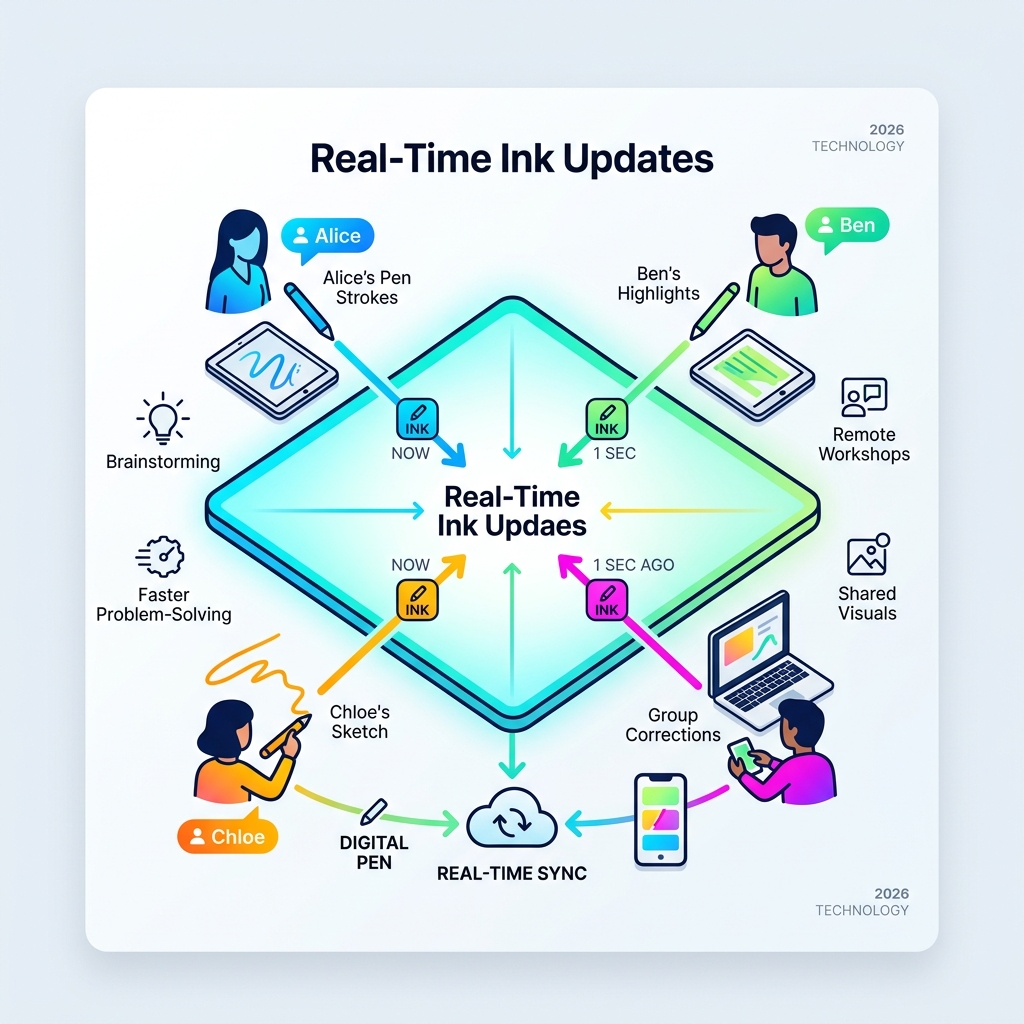
The benefits aren’t just anecdotal. According to scientific research on the benefits of collaborative digital workspaces, these environments significantly enhance group problem-solving and creative output. By providing a shared visual reference that evolves as quickly as the conversation does, teams can maintain a “shared mental model” that reduces misunderstandings and accelerates project timelines.
Frequently Asked Questions about Handwriting Sync
How does real-time sync handle offline changes?
Most modern systems use an “offline-first” architecture. This means the app saves every stroke to your device’s local memory immediately. When you regain an internet connection, the app compares the “timestamp” of your local note with the version in the cloud. Using advanced conflict resolution, it pushes your new changes up without overwriting work done on other devices. This process is usually so fast that users never notice the transition between offline and online modes, ensuring a seamless flow of thought.
Can I sync my handwritten notes across different mobile operating systems?
Yes! While some legacy tools were restricted to specific ecosystems, the industry has moved toward “Universal Sync.” Leading cloud-connected platforms offer robust applications for all major mobile and desktop operating systems. As long as you are signed into the same account, your notes will move freely between your various tablets, phones, and computers. This flexibility is essential for professionals who might use one brand of tablet for drawing and another brand of phone for quick reviews.
What are the most secure encryption methods for note apps?
The gold standard is AES-256 encryption at rest and TLS/SSL encryption in transit. AES-256 (Advanced Encryption Standard) uses a 256-bit key, making it virtually impossible to crack with current computing power. TLS (Transport Layer Security) ensures that even if someone intercepted the data while it was traveling to the cloud, they wouldn’t be able to read it. For maximum security, look for systems that offer “Privacy Locks” (like biometric authentication) and end-to-end encryption, which ensures the service provider themselves cannot access your private data.
Conclusion
The days of losing your best ideas to a misplaced notebook or a dead tablet are over. Whether you choose the AI-powered features of advanced digital ink platforms, the encrypted reliability of secure cloud systems, or the eco-friendly flexibility of a reusable smart notebook, the goal is the same: ensuring your thoughts are always where you need them. The digital transformation of handwriting allows us to keep the cognitive advantages of the pen while gaining the organizational power of the computer.
With 99.9% uptime and data integrity now being the industry standard, there has never been a better time to embrace this technology. Stop leaving your brilliance on scraps of paper that disappear into the trash or get lost in the shuffle of a busy office. By centralizing your notes in a synced environment, you create a searchable legacy of your own ideas.
Ready to upgrade your note-taking game? Start your seamless syncing journey with Open Diode and discover how our cloud-connected tools can help you capture, sync, and organize your world.
