
Why Scattered Project Notes Are Killing Your Productivity
Organizing project notes is one of the highest-leverage habits you can build as a professional or student. Yet most people are drowning in sticky notes, buried email threads, and half-finished documents spread across three different apps.
Here are the best ways to organize project notes effectively:
- Use one dedicated document or folder per project – keep everything in a single place
- Apply the PARA method – sort notes into Projects, Areas, Resources, and Archive
- Create a “hub note” for each project with links, deadlines, contacts, and status
- Use timestamps and consistent templates for meeting notes and action items
- Choose a tool with cloud sync and search so notes are always findable
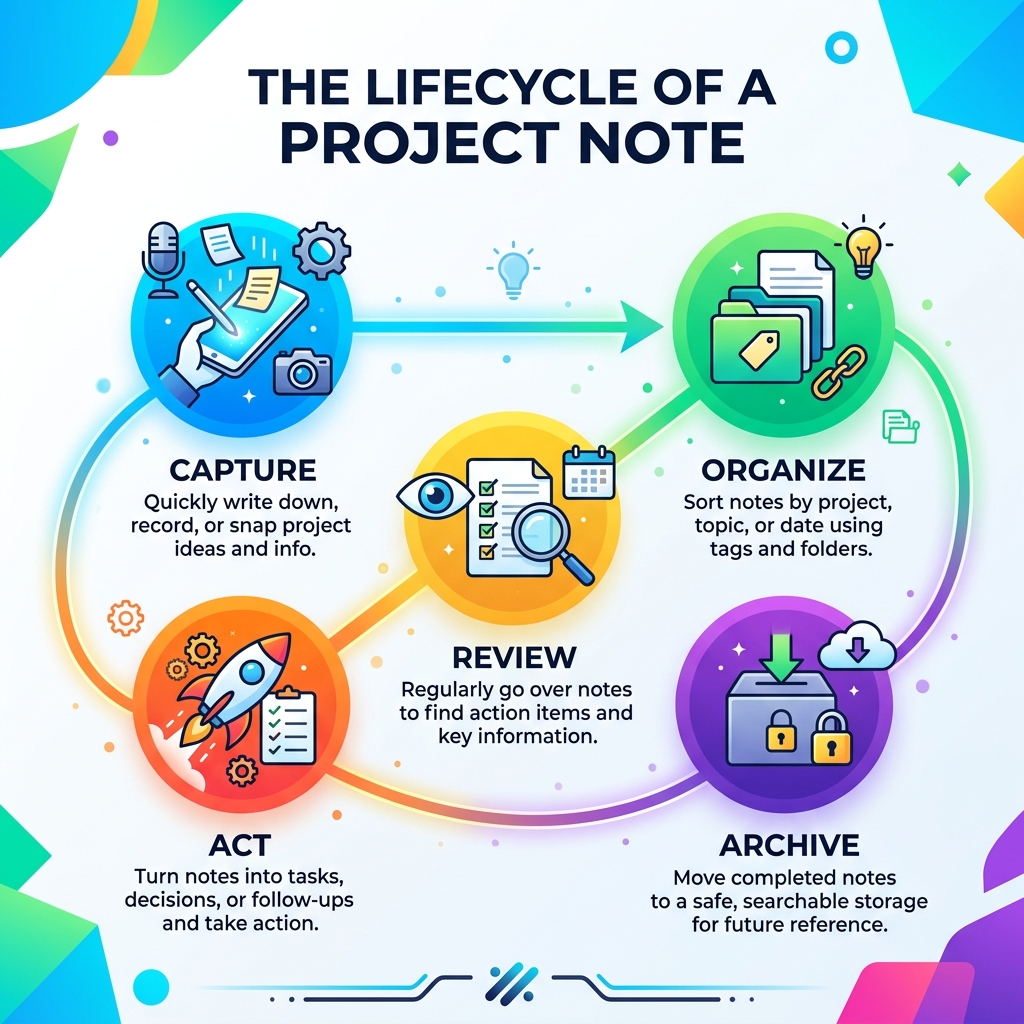
- Review and archive notes regularly – weekly reviews and a formal closeout process
Think about the last time someone asked you “why did we make that decision?” or “what did we agree on in that meeting?” If you had to dig through folders, scroll through Slack, or just guess – that’s the problem in action. It happens more often than you’d think. One professional with 15 years of consulting experience noted that someone asks exactly that kind of question about once a month.
The good news? A simple, consistent system fixes almost all of it.
This guide covers the best strategies, tools, and habits for organizing project notes – whether you’re managing construction projects, client work, or school assignments.
Why Organizing Project Notes is the Foundation of Success
We often treat note-taking as a passive activity, but when it comes to projects, it’s an active engine for progress. The primary reason we need a system for organizing project notes is that human memory is notoriously faulty. We might think we’ll remember the specific interest rate discussed or the reason we chose Vendor A over Vendor B, but six months later, those details vanish.
Effective organization creates a “second brain” that offers:
- Accountability: You have a paper trail of who said what and when.
- Informed Decision-Making: You can look back at past constraints and data to make better choices today.
- Reduced Stress: Knowing exactly where information lives prevents the “panic search” before a big meeting.
As Mark Koester highlights in The Power of Project Notes, a project note acts as a “sea captain’s log,” chronicling the daily evolution of your work. By adopting systematic-approaches-to-organizing-your-ideas-in-the-digital-realm/, we move away from reactive “firefighting” and toward proactive management.

Overcoming Common Challenges in Organizing Project Notes
Even with the best intentions, we face hurdles. The most common is information fragmentation. You might have a great idea while driving (voice memo), a key data point in an email, and a sketch on a napkin. Without a central system, these become “data silos” where information goes to die.
Another challenge is inconsistent naming conventions. If you name a file “Notes1” today and “ClientMeetingFinal” tomorrow, your search bar won’t help you. We recommend using memorable, descriptive names that include dates or specific project identifiers. For more on this, check out our key-tips-for-efficient-note-organization/.
The Impact of Organization on Team Collaboration
When you are organizing project notes for a team, the stakes are higher. Disorganized data leads to missed opportunities and project delays. On the flip side, a structured system provides a shared context. When a new team member joins, they shouldn’t have to interview everyone to understand the project’s history; they should be able to read the project hub and get up to speed. This reduces friction and ensures everyone is operating from the same “source of truth.”
Proven Strategies for Structuring Your Project Information
How you structure your notes depends on your personal “cognitive style.” Some of us love deep folder hierarchies (the “Filers”), while others prefer a flat structure with hundreds of tags (the “Pilers”).
| Feature | Folder-Heavy Structure | Tag-Heavy Structure |
|---|---|---|
| Best For | Hierarchical thinkers, fixed categories | Associative thinkers, cross-project work |
| Pros | Clear “home” for every note | Highly flexible, easy to cross-reference |
| Cons | Can become too deep/buried | Requires discipline to avoid “tag clutter” |
| Recommended Tool | Traditional File Systems | AI-powered or Linking apps |
One of the most effective frameworks we’ve found is the PARA method, popularized by Tiago Forte. It stands for:
- Projects: Things you are working on right now with a specific deadline (e.g., “Launch Q3 Website”).
- Areas: Ongoing responsibilities that require a high standard over time (e.g., “Health,” “Marketing Strategy”).
- Resources: Topics of ongoing interest that might be useful later (e.g., “Note-taking research,” “Web design inspiration”).
- Archives: Completed projects or areas that are no longer active but contain valuable reference material.
Implementing this system ensures that your most relevant notes are always front and center. To dive deeper into this, read how-to-master-digital-note-organization-for-maximum-efficiency/.
Using Tags and Linking for Organizing Project Notes
Modern digital note-taking has introduced a game-changer: bi-directional linking. By using a simple syntax like [[Project Name]], you create a web of knowledge. If you mention a contractor in a meeting note, you can link to their specific contact page. This allows you to discover relationships between ideas organically.
We also suggest using broad status tags sparingly. Instead of tagging every note with fifty keywords, use a few high-level tags like #WIP (Work in Progress), #ToReview, or #Urgent. This keeps your sidebar clean and your mind focused. Learn more about these techniques-to-enhance-note-organization-and-retrieval-digitally/.
The “Folder Note” as a Central Project Hub
If you take only one tip from this guide, let it be this: create a Hub Note for every project.
Think of the Hub Note as the dashboard for your project. It should live at the top of your project folder and contain:
- The “Why”: A brief summary of the project goal.
- Status Update: Is it on track, delayed, or waiting for someone?
- Key Contacts: Links to the people involved.
- Quick Links: Shortcuts to the most important spreadsheets, folders, or external documents.
- Deadlines: A concise list of the next major milestones.
Integrating Meetings, Tasks, and Estimates into One System
A project isn’t just a collection of thoughts; it’s a mix of different information types. You have meeting minutes, cost estimates, contractor quotes, and task lists. The secret to organizing project notes effectively is integrating these into a cohesive flow.
Managing Meeting Minutes and Action Items
Meetings are where decisions are made, but if those decisions aren’t captured, the meeting was just “an email that took an hour.” We recommend using a reverse chronological log. Every time you have a meeting or make a decision, add a new entry at the top of your project note.
Each entry should have:
- A Descriptive Title: (e.g., “2023-10-25: Budget Review with Sarah”)
- A Timestamp: To track the evolution of the project.
- Key Decisions: Highlighted so they are easy to scan.
- Action Items: Clearly marked (more on this below).
For those who prefer handwriting their meeting notes, using-smart-notebooks-to-streamline-project-management/ can be a lifesaver. You get the cognitive benefits of writing by hand with the organizational power of digital storage. You can even explore creating-digital-notebooks-for-work/ to separate different clients or departments.
Effective Methods for Organizing Project Notes and Task Lists
Don’t let your “Next Actions” get buried in a 20-page document. Keep a dedicated section for tasks at the top of your Hub Note or in a linked “Task Tracker.”
We’ve found that a task list is most effective when it stays lean—ideally under 10–15 items. If it gets longer, it’s no longer a task list; it’s a wish list. Break your tasks into:
- Now: The 3–5 most critical things to do today.
- Later: Tasks that are important but not immediate.
- Waiting On: Tasks that require someone else to take action before you can proceed.
Choosing the Best Tools for Organizing Project Notes
The “perfect” tool doesn’t exist, but the “right” tool for you does. When looking for a platform to help with organizing project notes, prioritize these features:
- Searchability: Can you find a specific word inside a handwritten note or a PDF?
- Cloud Sync: Can you access your notes on your phone, tablet, and laptop?
- Reusability: Does the system allow you to clear out the “noise” and focus on the current work?
Bridging the Analog and Digital Divide
There is a powerful connection between the hand and the brain. Scientific research on the benefits of handwriting for memory shows that taking notes with a pen (or stylus) helps you process information more deeply than typing.
However, paper notes are hard to search and easy to lose. This is where smart notebooks come in. At OpenDiode, we specialize in cloud-connected notebooks like the Rocketbook Fusion. You can write your project plans by hand, scan them with an app, and have them instantly sent to your project folder in Google Drive, Evernote, or Slack. It’s the ultimate way to get the best of both worlds. For help picking the right one, see choosing-the-best-smart-notebook-for-effective-organization/.
Essential Features to Look for in Note-Taking Platforms
If you are going fully digital, look for OCR (Optical Character Recognition) technology. This allows the app to “read” your handwriting and make it searchable. You should also look for version control—the ability to see what a note looked like three days ago—and integration capabilities so your notes can “talk” to your calendar or task manager.
Maintenance and Long-Term Archiving Best Practices
A note-taking system is like a garden; if you don’t weed it, it will eventually become overgrown and useless. Organizing project notes requires regular maintenance.
- Weekly Reviews: Spend 15 minutes every Friday reviewing your active projects. Update the status, move completed tasks to the “done” pile, and ensure the Hub Note is accurate.
- Project Closeout: When a project ends, don’t just delete the folder. Move it to your Archive. Before you do, write a brief “Post-Mortem” note: what went well, what failed, and what you’d do differently next time.
- Digital Declutter: Periodically clear out your “Inbox” folder. If a note doesn’t belong to a project or an area, file it under resources or delete it.
By following these habits, you ensure that your system remains a tool for productivity rather than a source of clutter. You can even learn about creating-personalized-digital-notebooks-for-work-projects/ to keep your archival process as streamlined as your active work.
Frequently Asked Questions about Organizing Project Notes
How do I handle notes for multiple projects at once?
The best approach is to use a consistent folder structure for every project. If every project folder has a “Meetings,” “Research,” and “Final” sub-folder, your brain will know exactly where to look, regardless of which project you are currently focused on.
What is the best way to archive completed project notes?
Move the entire project folder to an “Archive” directory. If you use a digital tool, you can often “Archive” a notebook so it no longer appears in your active list but remains searchable. We also recommend saving a PDF version of the final Hub Note for easy reference.
Should I use tags or folders for project organization?
We recommend a “folder-first” approach for high-level organization (e.g., PARA) and using tags for “cross-cutting” information (e.g., tagging a note with #invoice regardless of which project folder it lives in).
Conclusion
Mastering the art of organizing project notes isn’t about finding a magic app; it’s about developing reflective intentionality. It’s about choosing to spend a few minutes today to save yourself hours of frustration next month.
Whether you prefer the tactile feel of a pen on paper or the lightning-fast speed of a digital database, the principles remain the same: centralize your info, use a consistent structure, and review your work regularly. At OpenDiode, we’re proud to provide the tools—like our cloud-connected smart notebooks—that help you bridge that gap and work like a true productivity ninja.
Ready to level up your system? Check out More info about smart notebook reviews to find the perfect companion for your next big project.
