
Your Windows Desktop Deserves Better Than Note Chaos
The best minimalist note taking app windows users can choose from right now includes these top picks:
| App | Best For | Free? | Offline? |
|---|---|---|---|
| Simplenote | Cross-platform sync | Yes | Yes |
| Joplin | Open-source + privacy | Yes | Yes |
| Notepads | Fast Notepad replacement | Yes | Yes |
| FocusWriter | Distraction-free writing | Yes | Yes |
| Standard Notes | Encryption-focused | Free tier | Yes |
Most note apps are easy to love at first. Then things get messy.
You start with one notebook. Then folders. Then tags inside folders. Then sub-tags. Before long, finding a note feels like excavating an archaeological site.
Feature-heavy apps like Notion or OneNote are powerful — but that power comes at a cost. More menus. More decisions. More time managing your system instead of actually writing.
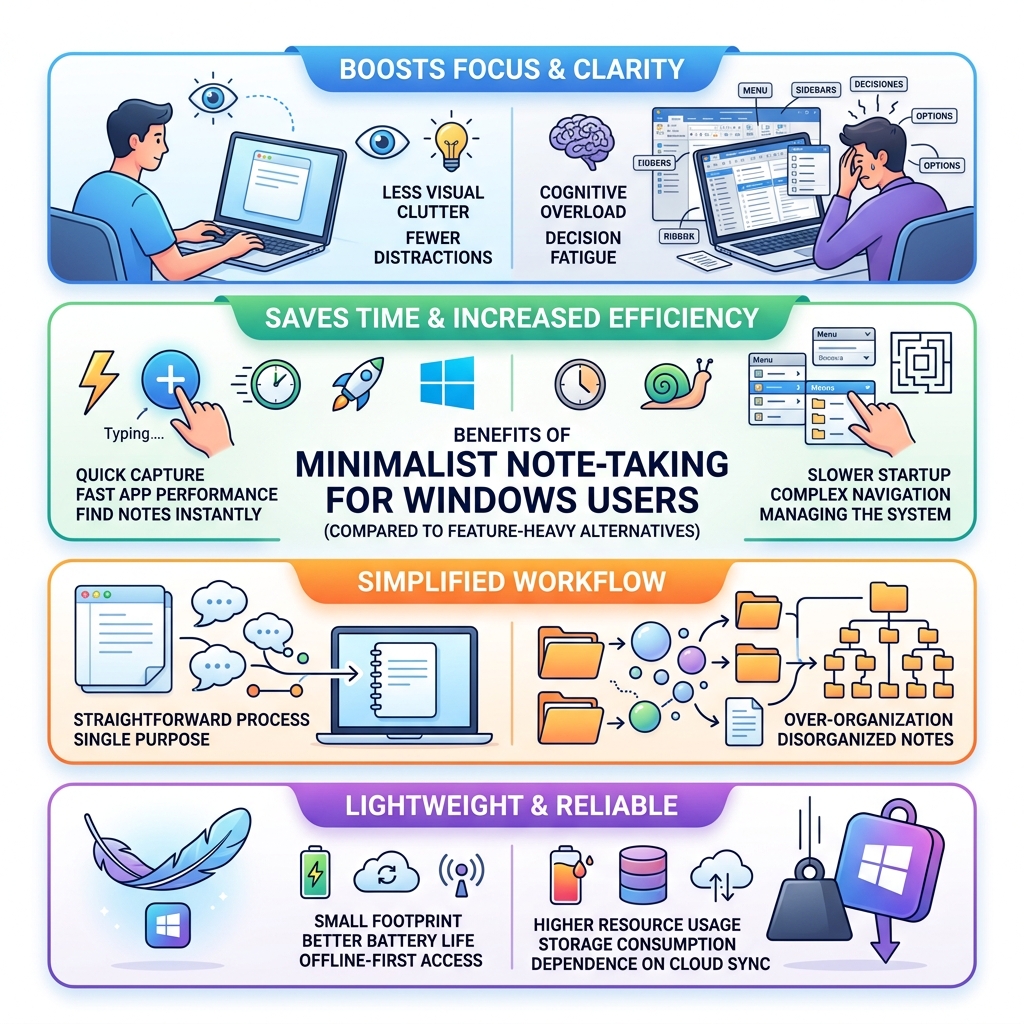
For Windows users who just want to capture thoughts fast and find them later, a minimalist approach works better. Less clutter on screen means less clutter in your head.
Research consistently backs this up: the true test of any note app isn’t how it feels on day one — it’s whether it stays manageable after months of heavy use.
Defining Minimalism in Digital Note-Taking
When we talk about a “minimalist” app, we aren’t just talking about a white background and a lack of buttons. True minimalism in software is about reducing the cognitive load. It’s about creating an environment where the tool disappears, leaving only you and your thoughts.
For us at OpenDiode, digital minimalism is a philosophy that prioritizes focus. You can read more about how this works in our guide on digital minimalism for enhanced focus. In the context of Windows apps, this usually translates to a few key technical characteristics:
- Lightweight Design: The app should open instantly. If you have to wait for a splash screen or a loading bar, the “minimalist” label probably doesn’t fit.
- Local-First Storage: Many minimalist apps prioritize saving files directly to your hard drive. This gives you total ownership of your data and ensures the app works perfectly without an internet connection.
- Markdown Support: Instead of complex toolbars for bolding and italicizing text, minimalist apps often use Markdown. It’s a plain-text way of formatting that keeps your hands on the keyboard and your files future-proof.
- Distraction-Free Interfaces: These apps often hide menus until you need them. Some, like FocusWriter, take over the whole screen to block out the rest of your Windows desktop.
Why Choose a Minimalist Note Taking App Windows Replacement?
Why bother replacing the built-in Windows Notepad or moving away from a giant like OneNote? The answer lies in the friction of the “Quick Capture.”
When an idea strikes, you need to record it before it vanishes. If your note app is buried under five layers of folders or requires a 10-second sync every time it opens, you’ve lost the moment. A minimalist note taking app windows solution removes these barriers.
By choosing a simpler tool, you benefit from:
- Reduced Bloat: Most of us only use about 10% of the features in a “heavy” app. The other 90% is just visual noise.
- System Performance: Minimalist apps rarely hog RAM. They are designed to be “blazingly fast,” often with file size limits (like the 1MB limit in Notepads) to ensure they never lag.
- Better Organization: Instead of complex hierarchies, these apps often use simple tags or flat folder structures. This forces you to use techniques for keeping your digital notes concise, preventing the “digital junk drawer” effect.

Top Picks for a Minimalist Note Taking App Windows Users Love
Finding the right balance between “too simple” and “too complex” is the goal. Here are the apps that have proven they can handle heavy, long-term use without becoming a headache.
Simplenote
Developed by Automattic (the folks behind WordPress), Simplenote is the gold standard for many. It is “simple on the surface, comprehensive underneath.”
- The Hook: It offers real-time syncing across Windows, Android, iOS, and the web for free. No sync button required—it just happens.
- Key Features: It uses a tag-based system for organization. You don’t dig through folders; you just search or click a tag. It also features a “version history” slider, allowing you to go back in time and recover text you accidentally deleted.
- Best For: Users who need their notes everywhere but don’t want to manage a file system.
Joplin
If you find the idea of cloud-only notes a bit scary, Joplin is the answer. It’s a robust, open-source alternative that handles digital note-taking for the modern minimalist with a focus on privacy.
- The Hook: It is local-first but offers end-to-end encrypted sync via Dropbox, OneDrive, or their own Joplin Cloud.
- Key Features: It uses a traditional notebook/sub-notebook structure, making it a great transition for people moving away from Evernote. It supports full Markdown and even has a mobile app that works just as well as the desktop version.
FocusWriter
FocusWriter is less of a “note organizer” and more of a “writing sanctuary.” It’s built on the Qt framework, which allows it to run smoothly on Windows.
- The Hook: When you open it, the interface completely disappears. You are left with a customizable background and your text.
- Key Features: The menus only appear when you move your mouse to the edges of the screen. It includes “daily goals” (like word counts or time spent writing) and even optional typewriter sound effects for that tactile feel.
Best Open-Source Minimalist Note Taking App Windows Options
For many minimalists, “open-source” and “minimalism” go hand-in-hand. Open-source apps are transparent—you know exactly what is happening with your data.
- Standard Notes: This app is famous for its “longevity” mission. The free version is strictly plain text, which is the ultimate form of minimalism. It features industry-leading encryption, ensuring that not even the developers can read your notes.
- Joplin: As mentioned, Joplin’s community-driven nature means there are dozens of plugins available, but you can keep it as bare-bones as you like.
- Notepads: This is a modern take on the classic Windows Notepad. It’s hosted on GitHub and has nearly 10,000 stars. It was created by a developer who was tired of waiting for Microsoft to modernize the built-in editor.
Lightweight and Privacy-Focused Alternatives for PC
If you are looking for something a bit more niche, there are several “indie” apps that offer unique takes on the minimalist philosophy. These often focus on “zero lock-in,” meaning they save your notes as standard files (like .txt or .md) so you can leave the app at any time without losing your work.
DumbNote
The name says it all. DumbNote is a “lightning-fast Markdown note app” designed for those moments where every second counts.
- Privacy: It stores everything as plain .md files on your machine. No cloud, no hidden folders.
- Speed: It’s designed to be opened, typed in, and closed. It even includes a “Typewriter Mode” to keep your active line centered on the screen.
NeatNote
NeatNote positions itself as the “sweet spot” between bare-bones editors and bloated apps.
- One-Time Purchase: Unlike many apps that want a monthly subscription, NeatNote is a one-time $9.99 purchase.
- Organization: It uses nested folders, which is rare for very lightweight apps. This makes it a great choice for students or professionals who need to categorize a lot of information without the “nonsense” of a larger platform.
MinimalistNotes
MinimalistNotes is a browser-based app that can be “installed” as a Windows app. It’s a passion project that is completely free.
- Unique Feature: It includes built-in voice dictation (speech-to-text), which is incredible for capturing thoughts when your hands are busy.
- Privacy: Your notes are stored in your browser’s local storage. They never leave your device unless you choose to share them via a temporary link.
For more on choosing the right utility for your desk, check out our list of essential writing tools for minimalists.
Fast and Modern Replacements for Notepad
Sometimes, you don’t need a “system”—you just need a better version of the Notepad that comes with Windows. This is where the Notepads App shines.
Notepads: The Modern Win32 Replacement
Notepads App is a modern, lightweight text editor with a minimalist design. It was built to feel like a native part of Windows 10 and 11, utilizing the “Fluent Design” system (that beautiful, translucent look).
- Blazingly Fast: It has a 1MB file size limit by design. This ensures that the app never stutters, even on older hardware.
- Tabbed Interface: You can have multiple notes open at once in a single window, much like a web browser.
- Markdown Preview: It includes a built-in Markdown side-by-side preview and a “diff viewer” so you can see changes you’ve made to a file.
- Command Line Support: Power users can launch it directly from the Windows terminal by typing
notepads.
It’s important to note that because it is a UWP (Universal Windows Platform) app, it has some restrictions. For example, it can’t save files directly into system folders like C:\Windows\System32. But for 99% of note-takers, this is a feature, not a bug—it keeps your system safe. You can find the source code and contribute at sercraig/Notepads or 0x7c13/Notepads.
Frequently Asked Questions about Minimalist Note Taking App Windows
Are these apps better than feature-heavy alternatives?
“Better” is subjective, but for many, the answer is yes. Feature-heavy apps like OneNote or Notion are great for team collaboration and complex project management. However, for personal thoughts and quick drafts, they often create “friction.”
Minimalist apps are designed for long-term use. They don’t get slower as you add more notes. They don’t change their UI every six months. They provide a frictionless writing experience that helps you avoid the overwhelm of a “second brain” that requires constant maintenance. We’ve explored this further in our review of digital note-taking tools for minimalists.
Do minimalist apps support Markdown and offline use?
Almost all of them do. In fact, Markdown is the preferred language of the minimalist. It allows you to format your text without taking your hands off the keyboard to reach for a mouse.
Offline use is another cornerstone of this category. Apps like DumbNote and NeatNote are “local-first,” meaning your notes live on your hard drive, not in a server farm somewhere. This makes your files “future-proof”—even if the app developer disappears tomorrow, your notes are just plain text files that any computer can read.
Where can I download these lightweight Windows apps?
You have three main options for finding these apps safely:
- Microsoft Store: This is the easiest way to install apps like Notepads or Simplenote. It handles updates automatically.
- GitHub: For open-source projects, the “Releases” page on GitHub is where you’ll find the latest .exe or .msi installers.
- Official Sites: Apps like DumbNeatAnd MinimalistNotes have dedicated websites with direct download links.
- Winget: For the tech-savvy, you can install many of these via the Windows Package Manager. For example, typing
winget install "Notepads App"in your terminal will handle the installation for you.
Conclusion
Keeping your Windows desktop clean isn’t just about hiding icons; it’s about choosing tools that don’t add to the digital noise. By moving your daily writing and thought-capture to a minimalist note taking app windows users recommend, you reclaim your focus.
Whether you choose the cross-platform ease of Simplenote, the privacy-first architecture of Joplin, or the modern beauty of Notepads, the goal is the same: a distraction-free space where your ideas can grow.
At OpenDiode, we believe the best tools are the ones that get out of your way. That’s why we created cloud-connected smart notebooks like the Rocketbook Fusion. They allow you to enjoy the tactile, minimalist experience of handwriting while seamlessly syncing your notes to the digital world. If you love the idea of a clean desk and a clear mind, you might find that smart notebooks are a minimalist’s dream come true.
Ready to declutter? Pick one app from this list, move your “active” notes into it, and feel the weight lift off your digital shoulders. For more info about minimalist note taking, stay tuned to our blog for the latest in productivity and digital minimalism.
